

Ask us your question
Answers to the questions you ask us most frequently
Answers to the questions you ask us most frequently
Rate the answer


Product Categories Products
Zigbee Outdoor Sensor 18012 Brightness Threshold
The Zigbee Outdoor Sensor 18012 is factory-set to a brightness threshold of 20 lux; this value can also be adjusted manually. To do this, briefly press the ‘learn’ button once when the brightness reaches the desired level. The button will flash once to confirm.
Can outdoor lights from the Plug & Shine range be used near a swimming pool?
All lights in the Plug & Shine range are pool water resistant and are suitable for use around a swimming pool.
Is there anything to bear in mind when connecting house 230v?
The house 230v range is connected directly to the 230V mains supply, without the need to install a power supply unit.
Is daylight sufficient for charging solar lights?
If solar lights are charged without direct sunlight, the battery takes longer to charge, or less energy is saved for the same charging time. As a result, the light will remain on for a shorter length of time after dark.
Can the Park + Light lighting system be connected to a 230V cable?
No, not directly. The Park + Light system operates on 12V DC (safety extra-low voltage) and must never be connected directly to a 230V cable, as this will damage the system and pose a risk from mains voltage.
A Park + Light transformer is always required for operation. This is connected to a 230V outdoor socket via its integrated Schuko plug and safely converts the mains voltage to the required 12V.
(Note: If only a fixed 230V earthed cable is available at the mounting location, a suitable outdoor socket must first be installed there by a qualified electrician.)
Can the coated MaxLED strip also be used outdoors?
Yes, thanks to the coating, the strip has an IP44 rating (splash-proof) and can also be used outside the house. However, when installing it, please note that heat-shrink tubing (70247) is required at all joints. Please note: The ballasts must be installed in an IP20-rated enclosure!
Why does the RGB strip only light up in one colour and cannot be controlled?
When connecting RGB strips to the RGB controller, it is important to ensure the correct polarity is maintained. If the LED strip does not respond to control commands and remains lit in a single colour, the polarity of the two connected components does not match. In this case, the plug connector must be disconnected, the terminal rotated by 180° and reconnected.
On what kind of surface can LED strips be installed?
Our LED strips require a smooth surface that is free from dust, grease and solvents for installation. The branded double-sided adhesive tape is already attached to the strip and ensures a secure hold.
In which versions are the plain-coloured Silver P25 strips available?
We offer the Silver P25 Strip as a single-colour strip in the following colours:
Item No. - Description - Colour
76006 - P25 red - red
76007 – P25 green – green
76008 – P25 blue – blue
76009 – P25 violet – violet
76010 – P25 iceblue – iceblue
76011 - P25 orange - orange
76012 - P25 RGBW - RGBW colour + white
76013 - P25 827 - warm white 2700K
76014 - P25 830 - warm white 3000K
76015 - P25 840 - neutral white 4000K
The URail cable power supply lead is too long – what should I do?
As an alternative to cutting the cable, it can also be wound fixedly around a thick screwdriver to create a sort of coiled cable.
In which colours is the ProRail3 system available?
We offer the following rail colours for ProRail3:
Deep black matt (RAL 9005)
Matt white aluminium / silver (RAL 9006)
Traffic white (RAL 9016)
Where is the terminal for connecting the 230V on the Linion Power Channel (item no. 98204)?
The quick-release clamp for the 230V connection is secured with a screw at a distance of 360mm from the edge.
Where on the ULine belt can the lights be positioned?
ULine lights can be fitted anywhere along the belt thanks to the Click and Connect technology.
What cable diameter are the rope spots designed for?
Paulmann’s spots for cable systems can be fitted to tension cables with a cross-section of up to 6 square millimetres and a diameter of 7 millimetres.
All the lights work normally for the first few minutes, after which only the first one ‘flashes’. Why is that?
One of the connections after the first light appears to be causing a short circuit. You should check that none of the nails or screws have pierced the cable. All connection points should be checked again.
My lights/transformer hum when I perform dimming – what’s causing this?
Dimmers function as fast electronic switches. This means that a dimmer switches the light off for short periods. The switching on and off processes cause abrupt changes in the magnetic field in conventional transformers. These changes in the magnetic field cause the transformer windings to vibrate, and this vibration is amplified particularly strongly on wooden ceilings. Loosening the screws might help. If necessary, you can place a rubber strip (foam rubber) between the transformer and the ceiling. This reduces the vibrations.
Are gu5.3 hexagonal light bulbs still available for downlights?
Hexagonal light bulbs are no longer available in our range.
Can Paulmann products be used in the sauna?
Our products are not suitable for use in a sauna due to the high temperatures and humidity.
Can the ground spikes also be used with the large bollard (95751)?
No, the ground spike is only suitable for the medium (95752) and small (95753) bollards.
Zigbee motion sensor (item no. 50133/50150) Kelvin colour values
The Zigbee motion sensor (50133/50150) detects motion and brightness; it is not capable of detecting Kelvin colour values.
Are the plugs and sockets for the Plug & Shine system available separately?
The plugs and sockets of the Plug & Shine system are always fixedly connected to the cable and cannot be purchased separately. If sold separately, the IP68 protection class could not be achieved.
Is the glass in the square recessed floor light, 230V (item no. 93993), clear or frosted?
The glass in the 93993 recessed floor light is frosted in the current production run. The pre-production batch with the same item number was manufactured with clear glass.
Can the lighting duration of solar lights be increased?
If the batteries fitted are of a single type, it may be possible in some cases to upgrade to a model with a higher capacity. A full charge will then keep the light on for longer.
Can I cut off the RCD plug on the Park + Light transformer so that I can connect it directly to a 230V cable?
As the manufacturer, we strongly advise against this.
Cutting off the plug will result in the immediate cancellation of the manufacturer’s guarantee, the statutory guarantee and CE conformity. Furthermore, as a result of this modification, the product is no longer in its tested condition.
Should a specialist contractor (electrician) nevertheless carry out direct wiring at the customer’s request, this is done at the contractor’s own risk.
Do all MaxLED connectors fit into every profile?
Yes, all our strips fit into all our profiles. However, if MaxLED strips are cut and reconnected, the connectors will not fit into our aluminium profiles. When using strips in profiles, we recommend installing them in one continuous length without any breaks, where possible.
What is the difference between YourLED and YourLED ECO?
YourLED: coated, 39 LEDs/m, 265 lm/m, can be cut every 7.5 cm
[Image]  YourLED ECO: uncoated, 30 LEDs/m, 160 lm/m, can be cut to length every 10 cm
[Image]
YourLED ECO: uncoated, 30 LEDs/m, 160 lm/m, can be cut to length every 10 cm
[Image] 
YourLED ECO: uncoated, 30 LEDs/m, 160 lm/m, can be cut to length every 10 cm
[Image] Does Paulmann offer LED strips with addressable LEDs?
No, we do not stock strips with individually addressable LEDs. For effects featuring colour-changing flashing LEDs or running lights, we offer our SimpLED Motion sets (item nos. 70513/70514/70515), which feature pre-set programmes.
Can different Pro Strips be connected to the same power supply?
Different Pro Strips can also be combined on a single power supply. If mixed types are used, e.g. dimmable single-colour and RGBW, different controllers are then required.
If different grades of the same type are used – for example, P25 and P150 in warm white – these can, in theory, be connected together behind a single controller. However, due to the difference in brightness, this would lead to varying results during dimming.
Is there a way to conceal the URail power supply within the rails?
The power supply to the URail system must be connected separately from the rail. The rail is connected mechanically and electrically by means of connectors.
Is the ProRail3 three-phase rail compatible with other systems?
Our components are compatible with various other manufacturers, as shown in the image:
[Image] 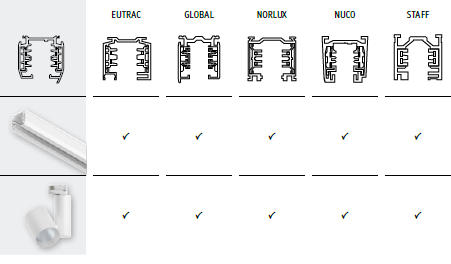
Where on the Linion Power Channel is the terminal for connecting the 230V?
On the Zigbee Power Channel (item no. 98181), the quick-release terminal is located xx cm from the end. On the Power Channel without Zigbee (item no. 98204), the terminal is xx cm from the end.
What material is the ULine lashing strap made of?
ULine’s textile lashing straps are made from Dacron fibres with internal copper conductors. This makes them tear-resistant, durable and easy to clean.
Can cable systems also be installed on plasterboard walls or ceilings?
Due to the tension required for installation, cable systems always need to be fitted to a fixed wall, ceiling or beam. Fixing them to plasterboard could cause them to tear out and does not provide sufficient support.
The downlights gradually go out after a few hours. Why is that?
All electrical transformers are fitted with a power-limiting device or a temperature monitor, which means that, for safety reasons, they switch off once a certain level of heat build-up is reached and switch on again once they have cooled down. Here, it is necessary to check whether heat build-up is occurring due to insulation materials lying on top of the transformer, or whether there is none of a continuous, ventilated cavity.
Are transformers dimmable?
It’s not a one-size-fits-all situation. Whether a transformer is dimmable depends on the type of transformer and the light bulb connected to it. As a general rule, both the transformer and the light bulb must be explicitly labelled as ‘dimmable’.
Depending on the transformer technology, the following rules apply:
1. Transformers for 12V AC (AC)
Here, the dimmer is installed on the 230V primary side (before the transformer):
Electronic transformers (EVG): Require a phase-cut dimmer (capacitive load – marked C or R,C).
Conventional transformers (block / toroidal transformers): Require a leading-edge dimmer (inductive load – marked L or R,L).
2. Transformers / power supplies for 12V / 24V / 48V direct current (DC)
Standard DC power supplies: These are usually not dimmable on the primary side via a wall-mounted dimmer. Dimming takes place on the secondary side (after the transformer) via an intermediate controller (e.g. Zigbee, BLE or wireless dimmer via PWM).
Primary-side dimmable DC transformers: Only specialised DC power supplies explicitly labelled as ‘dimmable’ can be controlled directly via a phase-cut wall dimmer. We do not stock such products.
Are Quadro gu5.3 light bulbs for downlights still available?
Quadro light bulbs are no longer part of our product range.
How does the Easy-Dim function work?
Our lamps and lights with the Easy-Dim function can be conveniently dimmed using the existing two-way switch. The dimming process is initiated by briefly switching the light off and then back on again (voltage pulse). At the lowest setting, dimming stops and can be restarted by switching the light off and on again in the opposite direction. Once the desired brightness is reached, it is maintained by briefly switching the light off and on again.When switched normally, the brightness returns to the preset level (100%). To reset the preset, the switch must be switched off and on again quickly three times whilst the light is at the set brightness level.
What types of sockets do ModuShine lights have?
The lights are compatible with E27 light bulbs.
Zigbee to loxone
Zigbee devices cannot be connected to the loxone system. loxone uses its own technology (“Loxone Air”).
For Zigbee, a Zigbee-compatible gateway is required (Paulmann Gateway Smik, Amazon Echo, Philips Hue Bridge or a Zigbee remote control such as the Paulmann Gent 2).
Is there a motion detector for the Plug & Shine system?
There is a twilight and motion sensor with item no. 18012, which requires the Zigbee controller (item no. 93999). The sensor cannot be controlled using the Gent remote control or Gateway. Furthermore, only one motion detector can be paired with the 93999 controller.
Can an earth cable be connected directly to the 230V recessed floor lamps?
None of the 230V recessed floor lamps in the Paulmann range are designed to be connected to an existing underground cable. Here, a junction box must be fitted and a suitable flexible conduit used.
Please contact your local electrician.
What type of battery is used in the remote controls for the solar LED strips (item nos. 71193/71194/71195/71196)?
The solar LED strips come with a CR2025 (lithium metal) battery in the remote control.
Can all park light lights be combined with one another?
All products can be combined as desired. The exception is the Park + Light Bimea outdoor wall light (94586) with a motion detector: this cannot be controlled using the Zigbee controller, the Zigbee remote control or the Park + Light motion detector controller.
Are profiles required for installing MaxLED strips?
Our MaxLED strips become lukewarm during use and therefore do not necessarily need to be installed on an aluminium rail. They can easily be stuck to wood or plastic (e.g. furniture)
What lengths are possible with the various transformers available from YourLED?
Please note the length specifications for the various strips in the table below:[Image] 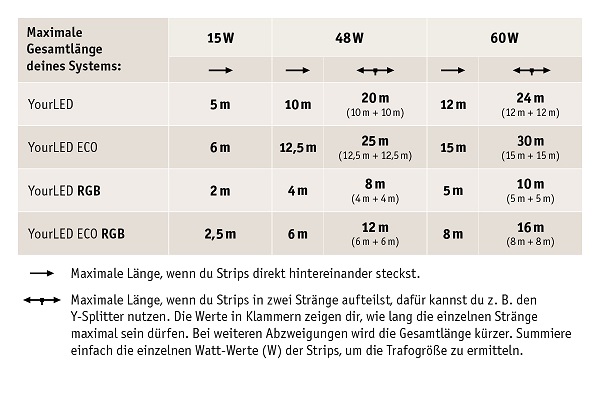
Are there also LED strips that run on batteries or rechargeable batteries?
You can find our range of portable LED strips here:
https://de.paulmann.com/innenleuchten/led-strips/mobile-strips/ (https://de.paulmann.com/innenleuchten/led-strips/mobile-strips)
What are the different levels of brightness offered by Pro Strips?
The following brightnesses correspond to the designations:
P25 = approx. 400 lm/m
P75 = approx. 700 lm/m
P150 = approx. 1500 lm/m
In which colours is the URail system available?
We offer the following rail colours for URail:
Black matt (RAL 9005)
Chrome matt (RAL 9006)
Pure white (RAL 9010)
Signal white (RAL 9003)
Titanium (none of the RAL colours, as it is not included in the standard RAL colour system)
How is Paulmann helping with the planning for the ProRail3 railway line?
The ProRail3 rail system for commercial uses should be planned and installed by an electrician. We do not offer any planning support for this.
What material are the light channels in the Linion System made of?
The light channels are made of aluminium and feature a plastic diffuser.
What colours are the ULine lashing straps available in?
We offer ULine lashing straps in the following colours: black, orange, grey, terracotta and green
Are cable systems dimmable?
It is possible to perform dimming of cable systems if a conventional block or toroidal transformer is used as the power supply.
In this case, the system’s brightness can be adjusted using a phase-cut dimmer (marked L). Please note: The light bulbs mounted on the cable must also be dimmable!
As DC cable systems use a non-dimmable ballast, their brightness cannot be adjusted.
Can downlights be connected in series?
Modern LED downlights are usually powered by 230V. They are wired in series using a parallel connection.
Should transformers be loaded with more or fewer components (load factor)?
A higher load causes the transformer to overheat; the maximum load must not be exceeded. This may cause the thermal switch or thermal fuse to trip. Transformers with thermal fuses are then permanently faulty. If the required minimum load is not reached, the light will not come on or will flicker. Here, the transformer must be replaced with a different model.
Will a lamp with a GU base fit into a light fitting with a GZ socket?
A GU lamp fits into a GZ socket, but a GZ light bulb does not fit into a GU socket. GZ lamps emit heat at the rear and can cause a light fitting to overheat. For this reason, GU sockets are installed in temperature-sensitive lights, so that a GZ light bulb cannot be inserted.
How does the White Select function work?
With the White Select function, the desired light colour is set using the DIP switch before the installation of the lights takes place (usually 2700K/4000K/6500K).
Are all the components compatible with one another?
All lamp heads are compatible with all base units, are easy to clip on and can be fitted with any light bulb of your choice
Have your Smik app settings been lost during an update?
After updating the Smik app or the Gateway firmware, the system can simply continue to be used with the previous settings. System information such as paired Zigbee devices, created areas and scenes is stored in a separate database on the Gateway. The displays in the Smik app are based primarily on this Gateway data. In addition, certain connection data and settings are saved locally on the smartphone, which are not affected by a software update.
Do the Plug & Shine controllers have a memory function?
Both the wireless controller and the Zigbee controllers have a memory function.
Why is my house wall light with a twilight sensor flashing?
If the twilight sensor in the light fitting detects reflected light, this may be interpreted as daylight and the lights will switch off again. The lights are particularly sensitive if they are fitted too close to a canopy or if the external wall has very light-coloured render.
What type of rechargeable batteries are required for the solar-powered house number lights (item nos. 79842–79851)?
For the solar-powered house number lights (item nos. 79842–79851), we recommend using LR06 Micro AAA 1.2–1.5 V Ni-MH rechargeable batteries with a capacity of at least 1500 mAh.
Are the park lights dimmable?
The lights in the Park + Light range are dimmable. The only exception is the Park + Light Bimea outdoor wall light (94586) with a motion detector.
How is the MaxLED Full-Line COB strip different?
In COB strips, the individual LED light points are mounted very close together and the phosphor coating is continuous. This process ensures that the light output is uniform and uninterrupted, in contrast to individually mounted SMD LEDs. Further information is available at: https://de.paulmann.com/innenleuchten/led-strips/maxled/maxled-full-line-COB/
How can I cut and combine different YourLED strips?
We offer a range of accessories in the YourLED range for rejoining cut strips and combining more components.
More information can be found on the website (https://de.paulmann.com/interior lights/led-strips/YourLED/yourled-zubehoer/).
Are the end caps for the profiles available individually?
If end caps are not listed as accessories on the product page for the profiles, we are unable to offer them for sale separately.
How do you read the coding on the Pro Strips?
The label on the Pro Strip identifies the light and helps when looking for replacement parts.
The LED strips are available in three brightness levels: P25, P75, P150
The light colour can be determined as follows using the three-digit code:
1st digit = CRI value (80 or 90)
2nd and 3rd digits = light colour in Kelvin (2700K, 3000K, 4000K or 6500K)
[Image] https://api-cdn.mypurecloud.de/response-assets/uploads/d5192263-9b3f-4274-b1f1-25d98f1f4778/7bfa9cf7-0a98-4808-a948-19ef5b5a99c4.cff64245-a143-41f6-9ce8-72eb26d91f7a
Is the URail system dimmable?
Generally speaking, lamps and lights fitted to the rail can be dimmed. The dimming capability of the rail system depends on the lights or light bulbs used.
What is the maximum capacity on the ProRail3 rail?
A total of 3,680 W of power may be used on the rails, with one power supply per phase, i.e. 3 × 3,680 W.
In which colours is the linion light channel system available?
The light channels are available in chrome matt (RAL 9006) and black matt (RAL 9004).
What lengths are the ULine lashing straps available in?
We offer ULine lashing straps in lengths of 5m and 10m.
What should be done if scorch marks are observed on the wire system?
All electrical connections must be fixed or fully plugged in, as good contact is essential for a long lifetime given the high currents involved. Screw connections should be retightened after 20 minutes and checked from time to time. If there are faulty connections in the low-voltage circuit, contact resistance may occur, leading to a significant rise in the ambient temperature. Here, discolouration and scorching of adjacent plastic parts can occur quickly. Should these symptoms occur in the lighting system, there are no grounds for a warranty claim.
Can Paulmann downlights be fitted into wooden beams with a hole in them?
To ensure a long lifetime, the LED light bulb should have sufficient space around it to allow for cooling. In addition to the minimum installation depth, we recommend leaving a clearance of approximately 15 cm all round.
When is a transformer needed?
A transformer or power supply unit is used to step down the voltage, for example from 230V AC to 12/24V AC or DC. In addition, there are transformers/power supplies that convert alternating voltage into a constant current (constant current), e.g. 350 mA or 700 mA.
Why are fluorescent tubes no longer available from Paulmann?
As part of the EU Ecodesign Directive (SLR/ELR Regulation) of September 2021, fluorescent tubes were also withdrawn from the product range in September 2023.
When I launch the app, does a ‘Timeout’ message appear? Can I simply confirm this by tapping ‘ok’?
You can click ok and carry on. Please let us know if the message appears more frequently.
What types of motion sensors are available?
A high-frequency sensor is available
Zigbee Products: memory function
After the power is switched off, Zigbee products retain the set parameters, such as brightness, white tone or colour temperature. The switch status is not saved, so the light comes on after the power is switched off and then back on again. This setting cannot be changed.
Does the Plug & Shine controller 18011 have a memory function?
Yes, the 18011 control system always starts up with the brightness setting used last time after being switched off.
What does the small grey dot on the Ronea outdoor wall light (94332/94333), near the fixing screw, mean?
This is the lights’ twilight sensor.
How can I ensure the lighting duration of my solar lights is as long as possible?
Please ensure that the solar light receives sufficient sunlight during the day to maximise its lighting duration. As a rule, our lights require around 8 hours of good sunlight for a normal operating time.
Can different power sources be combined?
No, only one power source can be used within a Park + Light system.
What lengths are possible with MaxLED?
Please note the length specifications for the various strips in the table below: [Image] https://content.paulmann.com/media/14/4c/f7/1787835472/MaxLED Trafotabelle DE_1200.jpg?ts=1787835479
How can YourLED be powered directly from a 12VDC source?
Our YourLED strips must always be operated using the power supply unit designed for them. If a different power source, such as a car battery, is used, this constitutes a change to the product, and any warranty and guarantee claims will thereby lapse.
Are there corner connectors for every aluminium profile?
Corner connectors are not available in our range for all profiles. Without the end caps, the profile must be mitre-cut to allow for installation around corners.
How can Pro Strips be connected after cutting?
Paulmann offers a range of connectors designed to connect cut Pro Strips to other strips or even cables.
Please note: The 8mm connectors are only compatible with P25 strips!
With the URail end power feed, can the live cable also be fed in from the front rather than from the top?
Yes, if the end cap is removed on the side opposite the rails, the 230V cable can be used for power supply there.
How can the ProRail3 rail be shortened?
The ProRail3 rail can be cut to size by a qualified technician. We do not offer a service for dispatching cut-to-size rails, as is the case with the URail system.
In what lengths are the straight Linion light channels available?
We offer the light channels in lengths of 0.5m, 1m and 1.5m.
In which light colours are the lights for the ULine belt system available?
The Bar, Bol, Cone, Ball and Ronde lights are fitted with warm white LEDs (3000K).
Which tension cables can also be purchased from Paulmann?
In addition to the system colours, we also offer the tension cables individually as ready-made 20-metre lengths with a cross-sectional area of 2.5 mm²:
94589 Transparent
94591 White
94593 Black
Do 3-step dimmable downlights have a memory function?
As a general rule, we do not offer a memory function for downlights with a 3-step dimming function. This is due to synchronisation issues when several lights are operated together.
Why is the transformer humming? How can this be prevented?
With conventional transformers, a minimal amount of noise is unavoidable. This can be dampened, for example, by placing a small piece of foam rubber under the mounting plate. If the noise level is higher than this, there is likely to be a fault. The device will need to be replaced.
What is the beam angle of 90°, 120° or 360°?
On the packaging of light bulbs, the beam angle at which the brightness was measured is stated below the lumen rating. We distinguish between measurements taken in a sphere (360°), a wide cone (120°) or a narrow cone (90°).
When the app starts up, a licence error message appears. Can this simply be confirmed by clicking ‘ok’?
You can click ok and carry on. Please let us know if the message keeps appearing.
Which light bulbs can be used?
Any light bulbs with an E27 socket can be used, including smart home light bulbs, insect friendly light bulbs or standard light bulbs
Paulmann Motion Sensor Outdoor 50136 Light Sensor
The motion sensor outdoor can detect brightness levels in twilight conditions and reports these regularly to the Smik Gateway. Furthermore, the measured brightness of the light sensor determines whether motion detection is activated.
Can the Plug & Shine system be connected to a 230 v cable?
Our pre-assembled cables feature a special plug connector that makes the system watertight. We do not recommend combining them with other cables.
How does the Rio socket column with timer (item no. 94314) work?
The timer is a mechanical device that has a switch for every 15 minutes of the day. Before use, the current time must be set. To do this, turn the ring clockwise until the correct time is aligned with the small arrow/triangle. For each time slot during which the power is to be switched on, the corresponding switch must be pushed outwards. For example, to switch the power on between 8 and 9 o’clock, the four switches between 8 and 9 should be set to the outer position.
How does a battery-powered or solar-powered light achieve the stated output?
Batteries should be fully charged, or at least charged to 70 per cent, before first use in order to achieve the specified runtime.
Which park lights can be controlled via the Zigbee controller?
The Zigbee controller can be used to control all the lights in the Park + Light system. These can be dimmed, switched on and switched off using the controller. The only exception is the Park + Light Bimea outdoor wall light (94586) with a motion detector.
Which accessories are suitable for the MaxLED COB strips?
All MaxLED accessories are compatible for switching and dimming.
Please note: As the circuit tracks and connections differ between MaxLED and MaxLED COB, connectors cannot be replaced on cut strips! [Image] 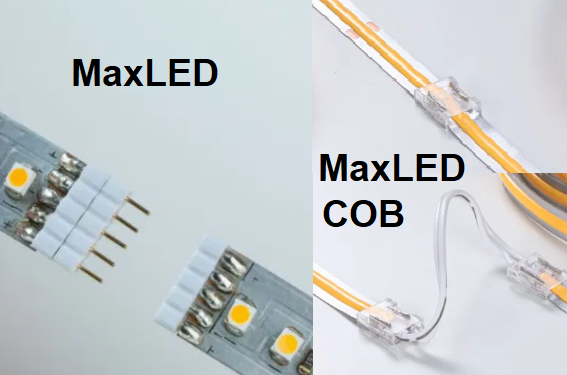
How many metres of YourLED strips can be connected to a transformer?
The number of metres of YourLED strips that can be used with each power supply is shown in our overview and is indicated on the packaging of the power supplies and starter kits
If the cable runs have a longer length and there are more transformers, can all the strips be operated simultaneously?
To this end, we recommend the installation of a wireless controller after each transformer. The controllers can then be linked together and controlled, for example, using a remote control.
Important: Depending on the type of wireless controller, different response times may be available and different linking options may be used.
What is the difference between Pro Strips Silver and Gold?
The Pro Strips Silver and Gold come with different specifications. The Gold strips, for example, have a higher colour rendering index of CRI > 90.
[Image] https://api-cdn.mypurecloud.de/response-assets/uploads/d5192263-9b3f-4274-b1f1-25d98f1f4778/98cfd2b3-4550-4754-bdfe-783454b69faf.821c1a12-80dd-4986-803b-21aa35b4a7bc
Can the cable be removed from the URail cable power supply?
For safety reasons, the feed-in fitting cannot be detached from the 16.5 cm connector, as is possible with the lights. Any connectors may be used at either end to connect to the subsequent rails.
What is the maximum length for laying ProRail3?
The ProRail3 rail can be laid with up to 12 connectors in succession, one after the other, downstream of the power supply.
In which light colours is the linion light channel system available?
All components of the Linion light channel system are fitted with warm white LEDs (3000K).
In which direction should the lights be fitted to the ULine harness system?
The LEDs can be fitted in any orientation thanks to the rectifier in the light heads.
What is the cross-sectional area of the tension cables in the basic sets?
The tension cables in the basic sets are supplied as a single length and have a cable cross-section of 2.5 mm.
Are there any downlights with motion detectors?
We do not currently stock any downlights with motion detectors in our range. One option would be to fit any motion detector in the 230V supply line to the lights. In this case, the lights should not be fitted with any dimming circuitry.
Why are there two 230V primary connection terminals?
The two primary terminals are connected in parallel on the transformer. If, for example, two transformers are to be connected to a single supply line, one transformer can be connected directly, whilst the second transformer can be connected to the second primary terminal.
What is a base?
The base is the part of the lamp that provides both mechanical support and electrical contact within a lamp holder.
Is technical support available if the Paulmann Bluetooth App stops working?
No, the app has not been maintained or updated since 31 July 2025. If the app stops working following a smartphone update, we recommend switching to Zigbee or using the Boss Bluetooth remote control (item no. 50001).
Smart Plug (50131) Memory function
Following an interruption to the power supply (power cut, etc.), the Smart Plug (50131) remains in the ‘off’ state.
Can the existing floor spotlights be connected to the Plug & Shine System?
As we use a specific connection on the low-voltage side, it is not possible to combine this with other items.
How can the LED module be replaced in the Durea recessed floor light (94654/94655/94656)?
The LED module in the Durea recessed floor light is fixed and cannot be replaced.
What is the hole spacing for fitting the 94233 solar wall light?
The two holes for the keyhole mounting are 85 mm away from the centre hole.
If a light fitting has a motion detector, can other lights be switched on by it?
A light’s motion detector can only control that particular light, as the switching signal is not transmitted outwards via the supply cable to other components.
How can the connectors on the MaxLED COB strips be disconnected?
Any connectors with crimp contacts passing through the circuit traces cannot be disconnected and reconnected.
Can the 70439/70440 corner profile also be fitted to the wall?
The Corner profile is designed for ceiling mounting, with indirect lighting provided by LED strips facing the wall.
Of course, the profile can also be mounted on the wall; however, our corner pieces will no longer fit in this altered orientation.
Compatibility between MaxLED and ProStrips
The MaxLED and ProStrips are not compatible with one another; they are two separate product ranges.
Can the cable for the URail power supply (96831/97679/95644/96916) be shortened?
The URail power supply cable can be pulled through the canopy to adjust it to the correct length. A qualified technician can shorten the cable at the terminal block and rewire it.
What is the ProRail3 rail suitable for?
With its three phases and standardised EUTRAC mounting system, the ProRail3 rail is designed for commercial users in professional areas.
For private users in residential areas, we recommend the elegant URail track.
Can the linion light channel system be shortened?
No, there are no plans to shorten the light channel.
Can ULine belts be connected to one another to extend the system?
No, it is not possible to extend it beyond 10 metres in length.
What cable cross-section should be used in cable systems?
For current cable systems fitted with LED components, a tension cable with a cross-sectional area of 2.5 square millimetres is sufficient.
Can a recessed furniture light be installed in a blind hole?
Our recessed furniture lights should have adequate ventilation, for example via a continuous cavity. There are recessed wall lights that do not require a cavity and are suitable for use in cavity wall boxes, equipment boxes, etc.
Why is the cable length limited to 2 metres for electronic transformers operating on alternating current?
This is required by law, as otherwise other devices could be interfered with due to the antenna effect. The following problems arise with longer cable lengths:
Radio interference can increase significantly, as the low-voltage cables act as transmitting antennas (the transformer operates in the high-frequency range).
At high operating frequencies (in the kilohertz range), the so-called skin effect occurs. This means that the full conductor cross section is no longer available for the transmission of current. The current is forced more towards the outer regions of the conductor. Less current flows in the centre of the cable. As a result, with longer cable lengths, the voltage drop increases disproportionately and the light becomes extremely dimmer. With star-shaped wiring (transformer in the centre), a length of 4 metres can be supplied (2 metres from the transformer in each direction). If this is not sufficient, a conventional AC transformer must be used instead.
What are halogen light bulbs?
Lamps with a tungsten filament that contain a special gas mixture, including halogens, are collectively referred to as halogen light bulbs.
Can a specific colour or dimming level be fixed on Bluetooth-enabled lamps and lights?
Lamps and lights with bluetooth have none of the memory function after the power is switched off. If the light is switched off using the light switch, it will come back on as warm white at 100 per cent brightness when switched back on.
Sun control in the Smik Gateway without a location
To make effective use of a routine control system based on sunrise or sunset, you need to specify your location. We do not currently offer any other option.
Can Plug & Shine be fitted as a retrofit?
Yes. The Plug & Shine lighting system can be laid underground when creating garden areas or installing a garden irrigation system, or installed above ground at a later date in existing flowerbeds, along hedges or, for example, on lawns.
How are cables laid in a house 230v domestic installation?
A 230V underground cable must be laid in sand at least 60 cm below ground level to ensure it is frost-proof. Please contact your local electrician.
What is the maximum permitted length of cable for Park + Light?
The maximum length of the cables between the power supply unit and the lights must not exceed 15 metres.
How can the extension cables (MaxLED Flex Connector) be connected to the MaxLED COB strips?
The MaxLED COB connector sets can be used to connect or reconnect cut strips. Please ensure you select the correct type: Item no. 71051 (solid white)
Item no. 71057 (Tunable White)
Item no. 71058 (RGBW)
Combination with the MaxLED Flex Connector extension cables (Art. 70576, 70575, 70574) is only possible on one side, as the 5-pin connectors are fixed to the connector sets.
Can I install LED strips in the bathroom?
When installing LED strips in the bathroom, the protection rating required for the relevant areas must be taken into account. For example, in the immediate vicinity of the shower and bath, the strip must have an IP65 rating.
Can the URail 230V system also be installed in the bathroom?
Due to the open design of the rails, through which 230V AC current flows, installation in the bathroom is not recommended. As the system’s cover rails have none of the necessary seals, this does not affect the protection class.
What is the power supply voltage for the Linion lighting system?
Linion light channels are powered by 24V DC.
What is the power supply for the ULine belt system?
The ULine belt system is powered by 48V DC.
How does the conversion from halogen to LED work in cable systems?
Our halogen cable systems are fitted with conventional transformers. These can be easily converted to LED without any minimum load requirement. Our LEDs are designed for higher minimum voltages (approx. 14V AC). Where transformers are already installed, the minimum load must be observed, as LEDs have a lower wattage.
Can downlights also be used in bathrooms or damp rooms?
Downlights can also be used in the bathroom. In this case, lamps with a minimum IP44 rating should be used. Special die-cast aluminium-zinc lights (corrosion-resistant) are available for damp rooms.
Why does the electronic transformer take a while to switch on?
The transformer performs a soft start. The converter detects a high inrush current and counteracts this using short-circuit current limiting, i.e. the inrush current is limited. This protects the LEDs from damage.
An excessive delay may also be caused by an overload of the electronic converter (transformer).
The soft start is completed within a maximum of 1.5 seconds.
What are cold-light mirror lamps?
The cold-light reflector lamp is a special type of reflector lamp. The term ‘cold light’ derives from the low proportion of heat in the emitted light. In the case of a halogen reflector lamp with a cold-light coating, the heat is predominantly dissipated backwards through the reflector coating.
Can the password for a bluetooth light be reset in the Paulmann app?
The password can be reset after the light has been reset. To do this, remove the light from the app and reset it (switch the power supply off and on five times at a moderate pace).
Switch ranges for the Paulmann Smart Switch (50134)
The Paulmann 50134 switch can be integrated into the following switch ranges:
Gira: Standard55, E2, Event, Esprit
Jung: A500, A plus
Merten: M-Smart, M-Arc, M-Plan
Berker: S1, B1, B3, B7 Glass
We do not guarantee long-term compatibility.
Can the Plug & Shine LED strips be cut to size?
The Plug & Shine LED strips cannot be cut to size.
Floor mount 94533, 94537, 94536 (Flarea)
The tin can be secured with 2 screws
What is the maximum permitted length of the cable when power is supplied from the Plug & Shine System via the adapter?
The maximum length of the cable is 15 metres. There is no difference between using the Park + Light solar panel, the Park + Light transformer or the Park + Light adapter for Plug & Shine.
How can MaxLED COB strips be cut and reconnected?
Special connectors are required to connect MaxLED COB strips after cutting. These are available for single-colour strips (https://de.paulmann.com/p/maxled-connector-set-full-line-cob-weiss/71051) and the Tunable White variants (https://de.paulmann.com/p/MaxLED-accessories-connector set-COB-Tunable White-white transparent/71057).
Can a dimmer be used in addition to the NightPIR sensor (item no. 70974/70961)?
As the control electronics of different control elements are not compatible with one another, only one device should be used on the low-voltage side.
Can the URail system be installed if there are only two cables in the ceiling?
The URail system requires installation with an earth conductor. Please contact an electrician who can assess the local conditions.
When installing the corner piece in the light channel system linion (item nos. 98171/98176), does the direction matter?
With the light channel system linion, the corner can be used in both directions.
Are the ULine belt system transformers also available individually?
No, an installation set (60W/150W) or a starter set is always required to install a ULine strap system.
How big is the round transformer housing on the cable system with a bluetooth unit?
The housing has a diameter of 160 mm and a height of 65 mm.
Can downlights be used outdoors?
In outdoor areas, care must be taken to ensure that lights with a minimum IP23 rating (protection against splashing water) are used. Due to the potential exposure to moisture, it is advisable to use corrosion-resistant downlights made of die-cast aluminium-zinc or plastic.
Salt-laden air near the coast may cause a build-up of deposits, which can be removed using standard cleaning products.
What type of fuse is required for conventional transformers?
The fuse rating is always indicated next to the fuse. The inrush current may cause the fuse to blow if the wrong type of fuse is used. There must be none of the following fuses marked M, MT or F used for this application: slow-blow (e.g. T 1.6A) or extra-slow-blow (e.g. TT 1.6A).
What are reflector bulbs?
Reflector lamps are light bulbs that contain a reflector and produce directed light. They are also known as PAR lamps.
Can the Boss remote control be used alongside the Paulmann app?
Yes, you don’t need to close the app to do that.
Languages and countries in the Smik app
The Smik app is available in German, English, French, Dutch and Spanish, and can be downloaded in all European countries.
Do you need specialist electrical knowledge to install Plug & Shine?
No. Thanks to a simple plug-in system, cables, lights and transformers can be connected easily and safely without the need for specialist electrical knowledge.
ModuShine
ModuShine is an outdoor light that can be customised to suit your preferences. Installation requires a light base, a shade and a light bulb.
How many park lights can be controlled simultaneously using the Zigbee controller?
You can easily control your system, which has a maximum power of 24 W, using the Zigbee controller (e.g. 8 lights at 3 W each).
How can MaxLED COB strips be routed around corners?
Corner connectors are available for the MaxLED COB strips in the corresponding light colours:
Item no. 71122 (1000 warm white 2700K)
Item no. 71130 (1000 daylight white 6500K)
Item 71117 (1000 Tunable White)
Item 71203 (1000 RGBW)
Item 71121 (500 warm white 2700K)
Item 71126 (500 daylight white 6500K)
Item 71113 (500 Tunable White)
Item 71203 (500 RGBW)
Can several LED strips be connected to a single power supply?
If a distributor is used on the low-voltage side behind the power supply unit, more strips can be connected to a single power supply unit with YourLED and MaxLED.
Can the URail L-connector be used in both directions?
You can use the L-connector for the installation of both a right-hand and a left-hand bend.
What types of connectors are available for the light tunnel system?
Each lighting unit comes complete with the necessary components for connection (stabilising plate, electrical connectors, 2 side connectors).
Why can’t the System be controlled using a wall-mounted dimmer switch?
As ULine power supplies are not dimmable on the primary side, dimming on the 230V side is not possible. With our 3-step dimmer (item no. 94644), the lights on the track system can be dimmed in three stages using a standard wall switch. This dimmer is fitted on the secondary side of the power supply unit.
How do you convert an old wire system to LED?
As cable systems have traditionally been operated using conventional pulley or toroidal transformers, retrofitting is very straightforward.
Such transformers have none of the minimum load requirement, so it is simply a matter of using the appropriate light bulbs with the correct base.
What type of cable should be used to install Paulmann downlights?
As a rule, a NYM cable with a cross-section of 3 × 1.5 square millimetres is used for this type of installation. Depending on the scope and lengths involved, a smaller cable cross-section may also be sufficient. Please consult your local installer.
What is a converter?
A term used to describe a ballast that converts the voltage level and frequency of the input voltage.
What are security reflector lamps?
SECURITY lamps are halogen reflector lamps. Unlike cold-light lamps, SECURITY lamps emit up to 80 per cent of their radiant heat forwards, in the direction of the light beam. This significantly reduces temperatures within the hollow ceiling, for example in downlights.
Can Bluetooth lights be integrated into a Zigbee system?
As these are different wireless protocols, bluetooth and Zigbee are not compatible with one another.
Zigbee lamp in more rooms
In the Gateway app, you can assign a lamp to as many rooms as you like. This is also possible with Alexa and Google Assistant. With Google, we use a workaround as this is not supported natively – we create the rooms as an additional dummy device, which is then broken down into the individual elements within the Gateway.
Can more than one remote control be used in a Plug & Shine system?
On the 18011 wireless remote control, controllers can be programmed to up to four different channels. The programming is not transferable, but the general buttons always apply to all accessible 18011/18010 wireless controllers simultaneously.
This means that several remote controls can also be used to switch all lights on and off. For more sophisticated control, we recommend the Zigbee Controller 93999 and the corresponding Gent2 50140 remote control, or a Zigbee gateway such as our Smik (item no. 50135).
Rio socket column
The Rio socket column is available in various versions with 2 sockets (94657) or 4 sockets (94313); a timer (94314) or a twilight sensor (94315). You can find more information here: https://de.paulmann.com/outdoor-lights/zubehoer-outdoors/
How can cut MaxLED strips be reconnected?
Cut MaxLED strips can be reconnected using the universal connector (70919). The clip-to-clip connector (item no. 70618) may only be used when connecting two uncoated strips to one another.
Can the aluminium profiles for strips also be used outdoors?
The aluminium profiles for LED strips are not intended for outdoor use. For outdoor applications, suitable strips with an appropriate coating should be used.
Can the URail t-connector be used in both directions?
You can use the t-connector for the installation of a branch to the right or to the left.
How big is the light channel system linion?
The channels measure 40 x 40 mm.
Why are some ULine lights difficult to attach to the belt?
Due to the structure of the belt, it may be slightly more difficult in some places to press the pins into the material to make contact. In this case, it may help to move the contact point by a few millimetres or to rotate the contact by 180°.
How can a wire system be tensioned at an angle?
The Article 17806 pulley can be used here. If the system has been tensioned relatively close to the ceiling, a sturdy hook with a suitable wall plug (available from a DIY store) can be used as an alternative.
Under which regulation is the small cable cross-section between the connection box and the Coin light bulb permitted?
There are two standards relating to this:
DIN EN 60598-1: 2015 Lights: General requirements
DIN EN 60598-2-2: 2012 Downlights
What happens if the output falls below the minimum power rating of an electronic transformer?
The light starts to flicker or does not light at all. Reason: a safety mechanism that switches off the transformer when it is not in use.
How big is the E27/E14 base?
The screw base features an Edison thread (E); the number following the E indicates the thread diameter in millimetres. Common sizes are 27 mm and 14 mm.
Can the bluetooth products be used without the app?
Alternatively, our bluetooth products can be controlled in 6 groups using our Boss remote control (item no. 50001).
Paulmann Motion Sensor Outdoor 50136 – permanently active
The motion sensor outdoor (50136) is battery-powered and would simply run out of power unnecessarily quickly if it were active all the time. The sensor wakes up regularly to measure the current level of twilight and transmit this data to the Smik Gateway. It is also activated when the level falls below the motion trigger threshold set by the user.
Are all Plug & Shine lights dimmable?
Almost all lights in the Plug & Shine range are dimmable. You can check whether a light is dimmable in the product description in the online shop (Dimmable: Yes/No).
How do I connect MaxLED COB strips?
Special connectors are required for the MaxLED COB strips (even after cutting). For the single-colour elements, we offer set 71051 (https://www.paulmann.com/71051); for Tunable White strips, set 71057 (https://www.paulmann.com/71057) and, for RGBW strips, set 71058 (https://www.paulmann.com/71058).
Can LED strips also be connected directly to 230V?
All our strips are operated at a low safety voltage and always require a ballast; therefore, they cannot be operated at 230V.
Can the existing wall-mounted dimmer switch control the URail system?
The existing dimmer must be compatible with the LED spotlights on the rails. The load specifications and dimming characteristics (R, L, C) must be checked.
What is the diameter of the circle formed by the curved elements (item no. 98172) in the light channel system linion?
The closed circle, consisting of four 90° bends, has a total diameter of 110 cm.
What are the dimensions of the current-carrying textile straps in the ULine system?
The ULine lashing strap has a width of 21 mm and a thickness of 2.8 mm.
What length can the tension cable have?
The length of the tension cable should not exceed approximately 15 metres. The appropriate diameter should be selected depending on the transformer, the number of light bulbs and their type. For lengths of 5–10 metres or more, we recommend using suspension brackets for stabilisation and a second tensioning set to ensure optimum tension.
Will the transformer fit through the opening of a downlight?
Downlights specify a minimum installation height for the respective type of downlight. If the ceiling has not been suspended sufficiently, the following situation arises:
Although the transformer fits through the installation hole in terms of its height and width, its length means it gets stuck when attempting to push it into the hole. The transformer must be installed elsewhere, but in such a way that it remains accessible. Our range includes special transformers sized for easy installation in hollow ceilings.
Which transformer should be used for LED lights?
Here are various types of ballasts for operating LED light sources:
LED transformer
These are conventional metal-core transformers that output a 12V alternating current (AC). These transformers are suitable for all 12V retrofit light bulbs (replaceable light bulbs that feature standard sockets and are modelled on 12V halogen light bulbs in terms of design).
DC LED power supply
These ballasts output 12V direct current (DC) and are suitable for lights without replaceable light bulbs, which are clearly marked on the type plate for operation with 12V direct current (DC).
LED Driver
These ballasts supply a constant current of 350/700/1000 milliamps (mA) (depending on the model) at a varying voltage (V). LED drivers are suitable for lights without replaceable light bulbs that are clearly marked on the type plate as being designed for operation with a constant current. The voltage is always direct current (DC).
How can you find the right light bulb?
For further information, please visit: https://de.paulmann.com/beratung/lichtlexikon/ersatzlampen-finden/ or here https://de.paulmann.com/leuchtmittel/
Can Paulmann bluetooth products be connected to smart speakers?
It is not possible to connect Paulmann Bluetooth products to smart speakers. The Paulmann Bluetooth system is designed to provide a closed, secure smart control system via an app and remote control.
Smart Plug (50131) with voice commands
If the Paulmann Smart Plug (50131) is connected to a Zigbee gateway and that gateway supports voice control, the Paulmann Smart Plug – just like other lamps and lights – can be switched on and off using voice commands.
Can all the products in the Plug & Shine range be used together?
All products are powered by 24-volt DC and can be combined as desired, up to the transformer’s capacity.
Where should the MaxLED strips be cut?
On the coated MaxLED strips, the markings can be identified as thin red lines. If this is not possible, the spacing can also be determined using the table below: [Image] 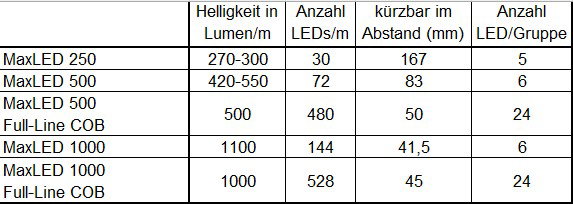
Can Paulmann LED strips be used in continuous operation?
Our LED strips can be operated continuously during the day in both domestic and commercial areas. They are not designed for continuous operation without any intermittent power cuts.
Can you also use URail to control lights with different shades of white or coloured lights?
Yes, that is generally possible.
For lights with replaceable light bulbs, you can fit smart bulbs with Tunable White (shades of white) or RGBW (shades of white + coloured light)
into the system. The light colour can then be controlled via a Zigbee remote control or a mobile app + Zigbee gateway. Alternatively, you can use lights with a built-in LED and an on-board Zigbee chip in the system. Models are available here with Tunable White (shades of white) or RGBW (shades of white + coloured light). These lights can also be controlled via a Zigbee remote control or a mobile app and Gateway.
How bright is the linion light channel system?
The light output of the Linion system is 1,000 lumens per metre.
How big are the power supply units with the connectors for the ULine System?
The round transformer boxes have a diameter of 250 mm and a height of 40 mm.
How does the cable cross-sectional area relate to the diameter of the tension cables?
The following dimensions apply to tension cables for the wire system: 2.5 mm² = 4 mm, 4 mm² = 6 mm, 6 mm² = 7 mm
Can the Nova mini downlights also be switched and dimmable using Zigbee?
Dimmable lights from the Nova mini range are all equipped with the Easy-Dim function, which is operated using a standard two-way switch. Only the non-dimmable lights can be integrated into a smart home via an upstream Zigbee controller, without the dimming function.
How do you find a suitable replacement transformer?
There is a Paulmann sticker on or underneath the transformer, on which you can find the product’s item number (usually a 5-digit number separated by a full stop, e.g. 123.45).If there is none of this information on our website, please contact our customer service team with the number.
Information on light bulbs/replacement bulbs
More information can be found in the following video: [Video] https://www.youtube.com/embed/53z-xgcsOQ0
Can existing lights be retrofitted with bluetooth?
Paulmann offers a range of controllers that allow you to easily upgrade existing lighting installations and lights to bluetooth control. Please note the supported dimming features for each dimmable light.
Smart Plug (50131) via Touchlink
The Paulmann Smart Plug (50131) can be controlled via Touchlink. To do this, you can use, for example, the Paulmann Gent (50067), Gent 2 (50140) or Basic Remote (50141) remote controls. More information on remote controls and Touchlink can be found on the product pages for the remote controls.
Why does the Plug & Shine system switch itself on automatically when using remote control 18011?
Our Plug & Shine remote control and receiver (item no. 18011), which uses radio technology, operates on the unlicensed 433 MHz frequency. As this frequency is also used by other manufacturers, interference may occur with nearby radio sources. This could be another Plug & Shine system, but also a garage door opener or, for example, a remote control used in the house. Any such interference may then cause the garden light to switch on without being actively switched on.
What is MaxLED?
MaxLED is an LED strip system with expandable components. There are three luminous intensities, a range of light colours, and options featuring white light control or colour change functions. As well as ready-to-connect sets, the strips can also be customised to suit individual requirements. Further information is available at: https://de.paulmann.com/innenleuchten/led-strips/maxled/
Can the LED strips be controlled using an app?
If you want to control the strips via Zigbee in conjunction with smart systems and devices in your home, you will need a Zigbee controller and a gateway with the relevant app.
Can URail be controlled using a remote control?
Yes, this is generally possible. Option 1:
Fit smart bulbs into lights where the light bulb can be replaced. You can then control these Zigbee smart bulbs using a Zigbee remote control (item no. 50140 for white and coloured light, item no. 50141 for white light only).
Option 2:
Install Zigbee components (e.g. middle feed, item no. 95669) into the base system. This allows you to control your system (switch on/off/dimming) using Zigbee remote controls (item no. 50140, item 50141) to control your system (on/off/dimming). If you are using Zigbee system components, the lights must not also have a Zigbee chip on board or in the light bulb used.
In both cases, you will also have the option later on to integrate your URail system into your smart home.
How can the power lead of the Linion Power Box be shortened?
The Linion Power Box’s power cable can be pushed into the box; it is not possible to shorten it by rewiring.
How long is the ULine cable running from the power supply unit to the belt inside the transformer housing?
The connection cable, with its two open ends and strap clip, has a total length of 50 cm.
How do you replace the fuse in a Toroidal transformer?
Conventional toroidal transformers are fitted with a slow-blow fuse, which is housed in a small holder beneath the cover.
This is pulled out from the front just enough to remove it; the required fuse rating can be read directly below it.
[Image]  [Image]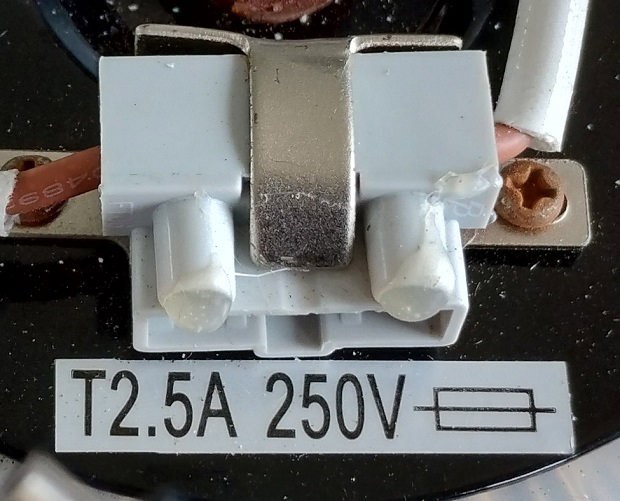
[Image] When is it permissible to use spacers with Paulmann downlights?
Paulmann’s range includes spacers for downlights whose LEDs do not exceed a power rating of 28W. This ensures a safe distance between the LED and the vapour barrier film with insulation material.
Please note: If the ambient temperature near the LED rises above 30°C for a prolonged time, this can significantly reduce its lifetime. We recommend installation in a suspended ceiling with a continuous cavity to ensure optimum ventilation of the LED.
How can lights be converted to LED?
It is important to note here whether the light is high-voltage or low-voltage. With high-voltage light bulbs (gu10, E27, E14), the light bulb can simply be replaced. With low-voltage light bulbs (gu5.3, G4), the minimum load/power rating of the transformer must be taken into account.
How can fluorescent tubes be replaced with LEDs?
When replacing fluorescent tubes, the ballast installed on site is crucial. A distinction is made here between conventional ballasts (CCG) with a starter and electronic ballasts (EVG). You can find the right led tube in the correct length in our online shop using the following criteria:
Mains voltage or conventional ballast: Type EM
Electronic ballast: Type HF
https://de.paulmann.com/leuchtmittel/led-roehren/
Can Paulmann bluetooth products be used with products from other manufacturers?
The Paulmann app and Paulmann Bluetooth products are specifically designed to work together. They are not compatible with products from other manufacturers. Paulmann Bluetooth products can only be controlled via the Paulmann app.
Multi-socket on the Smart Plug (50131)
It is possible to connect a multi-socket extension lead to the Smart Plug (50131), provided that the total load of the devices connected to the multi-socket extension lead does not exceed the plug’s maximum load. The relevant details can be found in the technical specifications area.
What happens if a light in the Plug & Shine string fails?
As the lights in the Plug & Shine system are wired in parallel, the failure of a single light does not affect the entire system. However, if a short circuit is the cause of the fault, this may, in some cases, also affect other components in the installation.
Control options
The MaxLED system offers various control options. For the single-colour versions, there is a touch switch (70975), a contactless switch (79840/71225) or motion sensors for use in the dark (70974/71226). Infrared remote controls or smart solutions are generally available for all variants. Further information at: https://de.paulmann.com/innenleuchten/led-strips/maxled/maxled-zubehoer/steuerungen/
Can cut strips be combined with corner connectors?
Cut strips – except COB strips – can be connected using a universal connector (item no. 70918 for YourLED / item no. 70919 for MaxLED).
Can you control URail via a mobile app?
Yes, that is generally possible.
Option 1:
Fit smart bulbs into lights where the light bulb can be replaced. You will then need a Zigbee gateway. The gateway can be the Paulmann ‘Smik’ gateway (item no. 50135) or a third-party gateway (e.g. Philips Hue, Amazon Alexa). Control is carried out via the gateway manufacturer’s app. The Paulmann app is available free of charge on iOS and Android. You use the app to connect the smart bulbs to the Zigbee gateway and can then control your lighting via the app.
Option 2:
Install Zigbee components (e.g. middle feed, item no. 95669) into the basic system. You will now need a Zigbee gateway – this can be the Paulmann ‘Smik’ gateway (item no. 50135) or a third-party gateway (e.g. PHILIPS Hue, Amazon Alexa). Control is carried out via the gateway manufacturer’s app in each case. The Paulmann app is available free of charge on iOS and Android. Using the app, you connect the URail Zigbee components to the gateway and can then control your URail system via the app (on/off/dimming).
How long can the Linion light channel system be extended?
The maximum system length is 8 metres with the Power Channel Zigbee (item nos. 98181/98182) and up to 5 metres with the Power Channel On/Off (item nos. 98204/98205).
What is the maximum length for which the ULine belt system can be planned?
The maximum length of the ULine harness system is 10 metres.
Why do the Nova Coin downlights only state IP20?
The individual components of the Coin downlights have an IP20 protection rating only.
If the light bulb and downlight frame are fitted correctly together into the suspended ceiling, the resulting protection rating will be IP23, IP44 or IP65, depending on the frame type.
How warm or hot do the ballasts in Paulmann products get?
Depending on the power supply unit’s output, the connected components and the ambient temperatures (ta – ambient temperature), different temperatures are to be expected on the surface of the power supply unit (tc – case temperature). This value can usually be read directly from the power supply unit. A maximum temperature of 60–85°C is not unusual in this context.
How can you tell if a light bulb is a high-voltage one?
Our high-voltage light bulbs are available in gu10, E27, E14, G9, B22d, B15d and R7s sockets and are marked as suitable for 230V.
Can the settings be transferred from the Paulmann Home app to the new Paulmann Bluetooth App?
Unfortunately, this is not possible. The apps have different feature sets and structures.
Amazon Echo device (Alexa) as a Zigbee network repeater
All devices that have been paired with the Smik Gateway are used as repeaters in the mesh network, provided the device supports this. As Amazon devices cannot be integrated into the network, this function is not available.
What are the spacing dimensions between the connectors on the various Plug & Shine cables?
The exact dimensions of the cables are shown in an image on the product page for each product.
Profiles for LED strips
You can find all the profiles at: https://de.paulmann.com/innenleuchten/led-profile/
Are aluminium profiles required for the installation of LED strips?
For the very high-performance Pro Strips P75/P150, we recommend using an aluminium profile for installation to aid heat dissipation.
All other models can also be installed without a profile on other materials such as wood or plastic.
Can URail track be fitted on slopes?
The URail track has been designed for ceiling or wall mounting. It can also be fitted on sloping ceilings.
What is the length of the cable suspensions for the linion light channel system?
The suspension arms can be adjusted continuously between 10 and 150 cm.
What is the length of the cable suspensions (item no. 94626) for the ULine strap system?
The ULine suspension cables (item no. 94626) have a maximum length of 2 metres and can be cut to any length.
Why do the recessed lighting modules only say ‘IP20’?
The light modules, when installed individually with their 230V connection boxes, do not offer any protection against moisture – provided they are not installed in a suspended ceiling.
After the installation in the appropriate cut-out, the space behind the ceiling is sealed, providing protection against water spray (IP23) or splashing water (IP44).
How can you tell if a light bulb is low-voltage?
Low-voltage lamps are marked with the low-voltage rating, e.g. 12V.
Can Paulmann bluetooth products be controlled simultaneously using more smartphone apps?
Although any number of mobile phones can be connected to the devices, only one active connection is possible at a time. The active connection on the other mobile phones must first be exited (by closing the app). Simultaneous use with the Boss remote control (item no. 50001) is always possible.
A Zigbee gateway is essential for using Zigbee products
Zigbee offers a feature called Touchlink. Touchlink is a Zigbee feature that enables devices in close proximity to connect directly to one another and communicate without needing to be on the same network or connected to a Gateway.
If Zigbee actuators are connected to controls via Touchlink, they can be controlled easily even without a Gateway, e.g. using a Paulmann Gent (item no. 50067), Gent 2 (item no. 50140), Basic Remote (item no. 50141) or the Paulmann Smart Switch (item no. 50134).
What is the cross-sectional area of the Plug & Shine cables?
The Plug & Shine cable is of the H07RN-F type with a cross-sectional area of 2 × 1.5 mm².
Plan a MaxLED system
You can use our adviser to help you plan a system: https://de.paulmann.com/innenleuchten/led-strips/berater-led-strips/?
Can the digital LED strips be extended?
The digital sets cannot be expanded; only the components included in the package may be used.
Can different dimmable spots be used on the URail track?
Yes, but when the URail system is dimmed, spots that are as similar as possible should be used to ensure the light is as even as possible.
How are the Linion light channels dimmable?
Using our Zigbee power supplies with Power Channel or Power Box, the brightness of the connected system can be adjusted via a Zigbee 3.0 controller.We recommend our Gent 2 Zigbee remote control (item no. 50140) or the Paulmann Smik Gateway (item no. 50135). Dimming via a light switch on the 230V supply line is not technically possible.
How can I get hold of the end caps for the ULine belt system?
The silicone end caps are included exclusively with ULine belts. They are not available individually nor can they be ordered separately as accessories.
What is Zamac?
Our range includes various styles of die-cast luminaires. An aluminium-zinc alloy (Zamac) is used as the base material. These materials are more corrosion-resistant than steel and are therefore also suitable for use in bathrooms.
Eye friendly / Eye comfort
Yes, Paulmann has eye friendly light bulbs in its range. https://de.paulmann.com/beratung/lichtlexikon/eye-friendly/
When will I receive the bluetooth remote control to replace the app that is being phased out?
We will make the remote control available as soon as possible; it will reach customers by the end of September at the latest.
Light-up time for the Paulmann Plug (50131)
The Paulmann Plug (50131) can only switch lights on and off, but cannot perform dimming.
How does the power connection work with Plug & Shine?
With the Plug & Shine lighting system, the power supply is connected to just one external socket. From there, any number of cables can be laid and connected to one another.
What is MaxLED Stair?
MaxLED Stair strips are specially designed for lighting staircases. Strips are available for both step and handrail lighting. Depending on the length of the staircase, 1–18 steps and 1–10 m of side strip can be illuminated. The wireless sensors switch the light on when movement is detected. For further information, visit: https://de.paulmann.com/p/maxled-stair-led-strip-installationsset-max.-25w-25va/71217
Can LED strips be cut to any length?
On LED strips, the chips are generally fitted in groups. For this reason, the strips may only be cut at specific intervals.
You can find more detailed information on the individual products in the relevant installation instructions and in the overview brochure (https://content.paulmann.com/media/4d/fb/e3/1667529090/505000101_Paulmann_D_MaxLED_Strips_Profile_A5.pdf).
Can both sides be disconnected separately on the URail Zigbee middle feed?
No, the power supply contains a control unit that monitors all connected devices simultaneously.You can find more information on installing URail with Zigbee here (https://de.paulmann.com/innenleuchten/schienensysteme/urail-230v-schienensystem/zubehoer/smart-home/).
How do you remove the cap from the ballast connection on the Linion Power Box (98178/98179/98206/98207)?
The cap is fitted with a positive fit; the best way to remove it is to pry it upwards using a large screwdriver and a bit of force.
Why aren’t the positive and negative terminals on the cable marked for connecting the ULine power supply?
The lights in the ULine range require 48V DC; the polarity of the supply cable is irrelevant.
What replacement Coin light bulbs are available?
Base Coin warm white (Item No. 93076 (https://de.paulmann.com/search?search=93076))
Base Coin 3 Step Dim warm white (Item 93077 (https://de.paulmann.com/search?search=93077))
Nova Coin warm white (Item 93069 (https://de.paulmann.com/search?search=93069))
Nova Coin neutral white (Item 93071 (https://de.paulmann.com/search?search=93071))
Nova Coin warm white 3 Step Dim (Item 93070 (https://de.paulmann.com/search?search=93070))
Nova Coin neutral white 3 Step Dim (Item 93072 (https://de.paulmann.com/search?search=93072))
Nova plus Coin warm white – dimmable (Item 93078 (https://de.paulmann.com/search?search=93078))
Nova plus Coin neutral white – dimmable (Item 93079 (https://de.paulmann.com/search?search=93079))
Nova plus Coin warm white reflector (Item 92471 (https://de.paulmann.com/search?search=92471))
Which lamps are dimmable?
Dimmable light bulbs can always be identified by a corresponding description or pictogram. https://de.paulmann.com/beratung/lighting lexicon/dimming/
When will the Paulmann Bluetooth App be switched off?
The Paulmann Bluetooth App was taken offline on 31 July 2025.
Paulmann is compatible with the Lola Smart range
The Lola Smart range uses WLAN and proprietary infrared signals to control the lights. With the smik Gateway and the Zigbee protocol, Paulmann is focusing on a stable, cross-brand solution.
What is the diameter of the Plug & Shine cables?
The Plug & Shine cable, including the connector at either end, has a diameter of 20 mm; however, the cables have different numbers of fixed outlets. Due to these branches, an optional conduit with an internal diameter of at least 45 mm is required. As the cables are IP68-rated, we recommend laying them directly on the floor.
Combining StairLED with MaxLED
The MaxLED connectors (70574, 70575, 70576) can also be used with StairLED.
Why isn’t the adhesive holding on my LED strips?
The 3M or Tesa adhesive strips on the back ensure a fixed hold.
Before attaching the LED strips, the surface to which they are to be affixed must be free from grease, dust and solvents. It must therefore be thoroughly cleaned beforehand to ensure good durability; however, solvents prevent the adhesive from bonding properly.
Can individual spots on the URail track be booked separately?
There are two ways to switch on individual spots or pendants in the URail system:
1. A replaceable smart home Zigbee light bulb is fitted into the appropriate spotlight or pendant.
2. A light fitting with a built-in LED and on-board Zigbee chip is used.
3. The spotlight or pendant light with a standard fitting is inserted into the Zigbee adapter 96893/95523/95524 and switched via this adapter; if compatible, it can also be dimmed.
You can find more information on URail installation with Zigbee here (https://de.paulmann.com/innenleuchten/schienensysteme/urail-230v-schienensystem/zubehoer/smart-home/).
Where can I get the end caps?
The end caps are included with the power supply and can also be ordered from our online shop under item numbers 98625 and 98626 if required.
Which downlights are suitable for installation in a concrete ceiling?
All Paulmann downlights with a power rating of up to 28W can also be installed in concrete ceilings.
Please note: If the ambient temperature near the LED rises above 30°C for a prolonged time, this can significantly reduce its lifetime. We recommend installation in a suspended ceiling with a continuous cavity to ensure optimum ventilation of the LED.
Why can’t I download the new Paulmann Bluetooth App?
Please check the latest compatibility information on the Apple Store or Google Play.
Paulmann Gateway wall mounting
For wall mounting the Smik Gateway (50135), there is a recess on the rear panel to accommodate a screw head (keyhole mounting). The screw and wall plugs are not included.
How big are the connectors on the Plug & Shine cable at the front and back?
The plug and socket connections at the ends of the cables have a diameter of 20 mm and a length of 48 mm (plug) and 60 mm (socket) respectively.
How can I light my staircase without a mains power supply?
The StairStrip set ensures safety on the stairs without the need for a power connection (71120).
Why does the colour white sometimes appear slightly bluish on RGB strips?
In RGB strips, the colour white is produced by mixing the three colours: red, green and blue.
As the base colour of LEDs is generally blue, there may be a slight colour deviation.
To achieve a pure white, an RGBW strip with an additional white LED should be used.
Can the URail track be cut to size?
URail tracks must only be cut by a qualified electrician, as incorrect cutting may pose a risk of electric shock during subsequent use. On request, we will cut your URail track free of charge in our in-house Paulmann workshop. When placing your order in the online shop, simply select the desired length.
Please note: We do not offer a cutting service for the 10 cm rail, as this would make it too short for use.
What are the Linion ‘Straight/Curve Cover’ accessories designed for?
When a system is suspended, the covers can be fitted to the exposed rear panels to protect against dust and enhance the appearance.
Which downlights are suitable for Kaiser sockets (HaloX/ThermoX)?
All Paulmann downlights with a power rating of up to 28W can also be fitted into Kaiser boxes (HaloX/ThermoX). Please note: If the ambient temperature near the LED rises above 30°C for a prolonged period, this may significantly reduce its lifetime.We recommend installation in a suspended ceiling with a continuous cavity to ensure optimum ventilation of the LED.
Can recessed floor lamps also be installed right next to the pool?
Chlorinated water can corrode the surfaces of the lights; not all Paulmann lights are suitable for this purpose – they must be marked as ‘poolwater resistant’.
Using the Smik Gateway System (50135) during a firmware update
Whilst the Smik gateway (50135) is restarting, the system will be unavailable for a few minutes. We therefore usually carry out firmware updates at night between 3 and 4 am Central European Time. During this time, you can, of course, continue to switch the lights on and off using your standard switches.
How do you programme the Plug & Shine 18011 remote control with controller?
As a general rule, only the controller that is to be programmed should be connected whilst programming. All other components must be disconnected from the cable. The individual steps are as follows:
1. Disconnect the power supply from the transformer
2. Hold down the group button on the remote control (1, 2, 3 or 4)
3. Switch on the power supply
4. The connected light behind the controller will flash three times
5. Now release the group button; the process is complete
Acoustic Panels with LED Strips
These LED strips are specifically designed for acoustic panels and can be incorporated as a decorative feature. Sets are available in warm white and RGBW. Further information at: https://de.paulmann.com/detail/019e8758a36870918fbe3f1a6483f399
Why can’t I operate my system using the infrared remote control?
If the remote control uses infrared technology, there must be a clear line of sight between it and the receiver. The signal has a maximum range of approximately 7 metres.
Why might the glass on the URail Spot Blossom shatter?
As the glass is quite thin, even a tiny hairline crack combined with stress on the socket is enough to cause the glass to shatter. For this reason, the glass retaining ring should not be fixed too tightly during installation.
Which light bulbs with Zigbee control are compatible with downlights?
All downlights with standard dimensions are compatible with both gu10 light bulbs and our Coin modules.
The following items are available with Zigbee control:
gu10 RGBW (Item No. 29149 (https://de.paulmann.com/search?search=29149))
Coin dimmable (Item no. 93073 (https://de.paulmann.com/search?search=93073))
Coin Tunable White (Item no. 93074 (https://de.paulmann.com/search?search=93074))
Coin RGBW (Item 93075 (https://de.paulmann.com/search?search=93075))
Do recessed floor lamps require a drainage system?
Our recessed floor lamps are rated to protection class IP67. This means that the light is waterproof in the event of temporary submersion. If the water is unable to drain away due to the floor’s lack of permeability, appropriate drainage must be installed.
Zigbee accessories from Paulmann (remote controls 50067/50140, switch 50134, sensor 50136) on other gateways
Paulmann accessories are generally Zigbee 3.0-compatible; however, only our Smik Gateway 50135 has software specifically programmed for these components. For this reason, setting up the system with gateways from other manufacturers may prove somewhat complicated.
How can the ‘Plug & Shine’ system be set up with a cable length of more than 50 metres?
To achieve an installation length of over 50 metres, power must be supplied via several different power supplies. To ensure fault-free operation, the cable length between the transformer and the lights must not exceed 50 metres.
Controlling LED strips with music
SimpLED Motion Music offers music-controlled RGB running lights. The sound sensor makes the lights dance in time with the music – or they can be controlled via remote control. Find out more at: https://de.paulmann.com/detail/019c28c6d22b71b6888cf1bed3a4c826
Why does my LED strip respond to the TV’s infrared remote control, or vice versa?
As there are only a limited number of infrared codes, overlaps may occur between different products, meaning that a control from a different system may trigger unwanted commands. The simplest solution is to position the sensor on an LED strip so that it has none of its line of sight (e.g. behind a piece of furniture).
Why isn’t my URail Lento pendant light coming on?
Please check that the contacts protruding from the sides of the wedge-shaped holder (“shark fins”) are seated at right angles. If necessary, this can be corrected using combination pliers. Once inserted, you should hear a click to confirm that contact has been established with the rail.
What is the thickness of the rings on the downlights, or how many millimetres does a downlight protrude from the surface?
Our downlights are 2–3 mm thick; for a model with IP65 protection and the connected additional rubber ring, the total thickness is approximately 5 mm.
Do outdoor lights need special treatment in winter?
Our outdoor lighting is designed using materials that mean none of the following special treatments are required in winter and it can withstand temperatures down to approximately -20°C without damage.
Twilight sensor 18012 with Zigbee 3.0 Smik gateways
The 18012 twilight and motion sensor is designed for use in a Zigbee system without a Gateway and connects directly to the Zigbee devices to be controlled via Zigbee Touchlink.For use in a Zigbee gateway system, the Paulmann motion sensor outdoor (item number 50136) is ideally suited. With the Paulmann smik gateway and the Smik app, this sensor can be optimally configured to suit your own needs.
What is the maximum length of the Plug & Shine System’s cable?
No light fitting may be installed more than 50 metres from the transformer.
MaxLED strip, but it cannot be controlled
Check that the controller is connected correctly, as described in the relevant installation instructions.
Why isn’t the 70974/70961 night-time PIR sensor triggering?
For the sensor to function, the surroundings must be dark (illuminance at the sensor <10 lux) and movement must be detected within the detection range. Please note the positioning of the sensor.[Image] 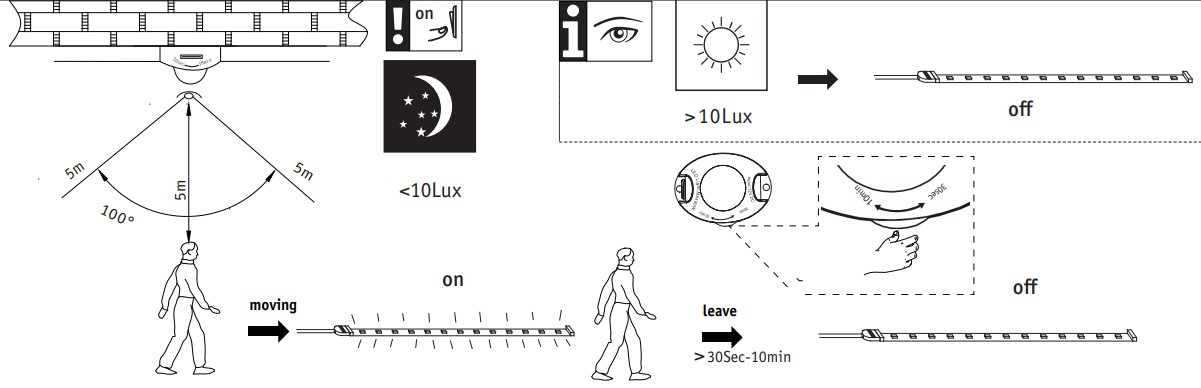
What should you bear in mind when performing wall mounting for URail?
If the URail system is wall-mounted, none of the spots with a pole base and a weight of more than 400 g should be fitted.
Due to the lever effect, the contacts would bend within the rail over time and damage the system.
What are the connectors on low-voltage downlights called?
In our DC LED and constant-current systems, we use JST and AMP plugs and sockets to ensure simple, reverse-polarity-protected connections between components.
Are Paulmann recessed floor lamps suitable for foot traffic and vehicle traffic?
If the recessed floor lamps are suitable for foot traffic and vehicle traffic, this will be clearly indicated on the light fitting and on the product’s outer packaging.
Paulmann Smart Switch (50134) connected to Amazon Echo via Zigbee
The Paulmann Zigbee Smart Switch can be used in conjunction with an Amazon Echo that features a Zigbee interface. To do this, first pair the wall switch with an Amazon Echo. Then connect the wall switch to the devices you wish to control via Zigbee Touchlink.The lights linked to the wall switch and the Amazon Echo can then be controlled simultaneously via the Paulmann Zigbee Smart Switch, the Amazon Alexa app and Amazon Alexa voice control. The wall switch can be used to switch lights on, switch them off and perform dimming. For example, the wall switch can be paired with an Amazon Echo as follows:
Reset the wall switch if you have already used it. Open the Amazon Alexa app – go to the ‘Devices’ category and tap the ‘+’ icon. Select ‘Add device’ and then the ‘Switch’ category. Select ‘Other’ as the brand and then start the device search. Activate the wall switch’s pairing mode. Once pairing is complete, the Paulmann Zigbee Smart Switch will appear in the Amazon Alexa app under the ‘Switches’ category.
Once the Smart Switch is connected to the Echo, move the Smart Switch close to the target light and start the Touchlink pairing process as per the Smart Switch instructions.
We have none of the influence over software changes made by Amazon. We do not guarantee that the Paulmann Smart Switch will work with Amazon Echo devices.
Pressing the two lower buttons on the wall switch three times can trigger either a reset or connection mode. If the LED flashes briefly just three times as confirmation, a reset has been performed. If the LED flashes more frequently, the wall switch is attempting to connect.
How long is the cable on the Plug & Shine lights?
The connection cable on each Plug & Shine light has a length of 30 cm.
SimpLED compatibility
The MaxLED system cannot be combined with other Paulmann LED strips. All MaxLED products are compatible with one another.
Which strips are compatible with the aluminium profiles?
All indoor strips from the MaxLED, YourLED and Pro Strips ranges are compatible with all aluminium profiles.
In the URail system, what is the difference between white and signal white?
The white rail is RAL colour 9010 (pure white), which generally does not match the colour of the walls or ceiling. If you would prefer a discreet colour for the rails that blends in with the background, signal white (RAL 9003) should be used.
How do I reset lights using Easy Dim?
Easy Dim lights revert to the set preset (factory setting 100%) when switched off and on again.
This can be set individually by operating the light switch as follows:
1. Switch the light on, then switch it off and on again within three seconds (the light will now begin to dim slowly)
2. Once the desired brightness is reached, switch the light off and on again briefly (the brightness will remain the same)
3. To save the set value, switch the light off and on three times (the new preset is set)
Easy Dim lights can be reset by switching them off and on five times.
Why does the weld on the light break when it is installed using the ground spike?
When assembled, the light’s welded joint cannot withstand the pressure exerted when it is driven into the ground. To install it, first drive the spike into the ground and then mount the light onto it.
Smart Plug (50131) with the Paulmann Bluetooth App
The Paulmann Smart Plug (50131) uses Zigbee as its wireless protocol and cannot be controlled via bluetooth. To control the Paulmann Smart Plug, you can use a remote control such as the Paulmann Gent (item no. 50067) or Gent 2 (item no. 50140), or a compatible Zigbee gateway (e.g. Smik, item no. 50135) with an app.
How deep do the cables for the Plug & Shine garden system need to be laid in the ground?
As the low-voltage protection system operates at 24V, the cable does not need to be buried and can also be laid amongst bushes, under bark mulch or amongst pebbles. Thanks to its IP68 rating, the cable may also be used on the floor.
Are connectors required for uncut LED strips?
All YourLED and MaxLED strips are supplied with the appropriate 4- or 5-pin connectors, which you will need to connect two uncut strips or to connect accessories.
Additional connectors are required to bridge differences in height and longer distances between two components, or for cut LED strips. These can be found in the accessories section.
What should you do if the URail Spot Circle flickers and flashes?
If the spotlight is installed in the kitchen, an induction hob may, in some cases, be responsible for the discrepancy. To test this, the spotlight can be installed in a different location within the System.
How should the quick-release clamps on Paulmann lights be used?
Our terminal blocks are designed as quick-connect terminals for solid wire. Such a wire locks into place automatically when inserted. If a flexible cable is to be used, a ferrule must always be fitted.
When inserting the flexible cable into the terminal, the lever must first be used to open the clasp and then released once the cable is in place. We therefore recommend using a NYM cable with a cross-section of 1.5 mm².
Why is there water in the recessed floor light?
Please ensure that the lights are not submerged in water, for example after rain; you may need to lay a bed of gravel around the light. The lights are rated IP65 (protected against water jets) or IP67 (waterproof when temporarily submerged) and are not designed for permanent submersion.The installation instructions state that the lights should not be recessed into the floor or come into direct contact with the floor (lawn, topsoil) at the sides. The screws on the cover must be fixed and the sealing ring must be positioned correctly. The safest method is to tighten the screws in a criss-cross pattern.
Zigbee Indoor Sensor (Item No. 50133) for outdoor use
Thanks to its IP54 rating, the 50133/50150 motion sensor can be used in sheltered outdoor areas. We recommend using the outdoor version (item no. 50136) instead.
How deep do Plug & Shine cables need to be buried underground?
As this is a low-voltage system, there is none of a minimum depth that needs to be taken into account during installation. The cables can also be laid above ground in flowerbeds or beneath plants.
How do the effects on digital LED strips work?
The digital LED strip can display one or more colours statically, as well as various moving patterns. Further information can be found via the relevant links: DE:https://de.paulmann.com/service/installation-instructions-&-tips/tip-digital-led-stripe/
AT:https://at.paulmann.com/service/montageanleitungen-tipps/tipp-digital-led-stripe/
CH:https://ch.paulmann.com/de/service/montageanleitungen-tipps/tipp-digital-led-stripe/
What might be the causes of noise in the URail system?
Noise may be caused by the use of dimmers or switches that are incompatible with the LEDs being used. This can be tested by removing all lights from the rail.
If a single light fitting is the cause, the spots can then be reinstalled one by one so that the source of the fault can be identified.
If noise is coming from the rails even when none of the lights are fitted, the cause is likely to be loose or over-tightened connectors. At each end of a connector, facing the rail, there is a small grub screw. This should be tightened but not overtightened, as this would cause the connector to be pushed out of the rail.
Is the Coin light bulb covered under the 5-year guarantee?
Replaceable light bulbs are covered by a limited 12-month warranty. When installing downlights, please ensure that the installation requirements are met (a continuous cavity with the minimum dimensions specified on the product) to ensure a long lifetime for the LEDs.
Why isn’t the light with the motion detector switching on?
Combined twilight/motion sensors are usually fitted inside the lights. If the sensor detects movement, it will only switch the light on if the surroundings are sufficiently dark.
Zigbee Indoor Sensor (Item No. 50133) without Gateway
The 50133 indoor sensor requires a Zigbee gateway for setup and configuration. The Paulmann Smik gateway, item number 50135, is best suited for this purpose.
How many metres of Plug & Shine LED strips can be laid in one go?
A maximum of two 5-metre strips may be laid one after the other.
How can an LED strip be routed round a corner?
The LED strips are supplied rolled up and, due to their design, can be laid in one piece around corners.
Avoid creating a sharp kink. If the strip is not visible – for example, behind a piece of furniture or inside a profile – this method ensures there are none of the dark corners.
[Image] https://api-cdn.mypurecloud.de/response-assets/uploads/d5192263-9b3f-4274-b1f1-25d98f1f4778/b3e125b5-dc90-4a4f-8cbc-792a7f633ca1.ebd65c79-63c4-4265-b8e9-dea417e241fe
The strips are flexible and can be bent around corners without any problems. Please take care when doing so and do not kink the strips, so that the small copper conductors inside do not break (see note in the assembly instructions).[Image] https://api-cdn.mypurecloud.de/response-assets/uploads/d5192263-9b3f-4274-b1f1-25d98f1f4778/31e5609d-5f75-429a-93a2-3fb26736c4b4.ecbea0f1-b375-47f3-aecb-2b4d0a188b79
Which URail lights are compatible with the Zigbee adapter (95676/95677/95678)?
Only lighting products with the standard mounting bracket and suspension rod, which do not require additional support on the rails, can be fitted to the Zigbee adapter. Spots fitted with the new Inline adapter are therefore not compatible.
Here is also the following diagram to refer to: [Image] https://content.paulmann.com/media/3f/e3/34/1787830130/Kompatibilität URail Spot Adapter.png?ts=1787830136
What do you need to bear in mind regarding outdoor lights in winter?
Outdoor lights are marked with a protection class that prevents the ingress of water and are constructed from materials that ensure even sub-zero temperatures pose no risk. In the event of prolonged frost, it is advisable to store outdoor lights indoors.
Our wooden outdoor lights should – just like garden furniture – be treated appropriately and moved indoors for temporary storage during prolonged periods of sub-zero temperatures.
If outdoor lights are covered by a layer of snow, they should not be switched on and the snow should be cleared away as soon as possible.
Zigbee Indoor Sensor (item no. 50133) – only compatible with the Smik gateway?
The Zigbee twilight and motion sensor can also be used with third-party products, although Paulmann does not guarantee this. To ensure full functionality, it is recommended that you use the Paulmann Smik Gateway (50135).
What is the maximum number of Plug & Shine lights that can be controlled in a single group?
The number of lights that can be controlled depends on their wattage. The maximum power rating of the installed transformer must not be exceeded.
Important: Our Zigbee and wireless controllers cannot switch more than 75W!
How should the 70439/70440 corner profiles be fixed in place?
The corner profile should be fitted to the ceiling using standard-grade construction adhesive.
Which URail spots are suitable for wall mounting?
If the URail Spot is suspended from a rod beneath the rail and weighs more than 400g, it must not be mounted on the wall. Please follow the specific installation instructions in this regard.
How do you install the Rio socket columns?
All Rio socket columns require a fixed surface to which they can be bolted. The holes in the base plate on all models have a diameter of 5.5 mm, and there are four holes in total.
The Rio twin socket column (Item No. 94657) has a hole spacing of 50 mm x 27 mm, whilst all other models (item nos. 94313/94314/94315/94700) have a hole spacing of 104 mm x 45 mm.
Zigbee Smart Switch 50134 connected to the Smart Friends Box (item no. 50066)
The 50134 wall switch is generally Zigbee 3.0-compatible, but requires software to set up its full range of functions. As the Smart Friends Box is no longer supported by Paulmann, none of the special software has been installed on it.
How is the Plug & Shine sensor 18012 paired with the Zigbee controller 93999?
The Plug & Shine twilight and motion sensor 18012 can only be paired with a single Plug & Shine Zigbee controller 93999. It is not technically possible to integrate it with the Gateway.
To pair the sensor, hold it as close as possible to the controller and follow these programming steps
1. Briefly press the Reset button on the sensor (the button will flash 5 times)
2. The connected light behind the controller will flash twice
3. After a short pause, the Reset button will flash once
4. Once the light has flashed again, pairing is complete
What are the exact dimensions of the 70517/70518/78901/70892 base profile?
Please refer to the following drawing for the base profile: [Image] 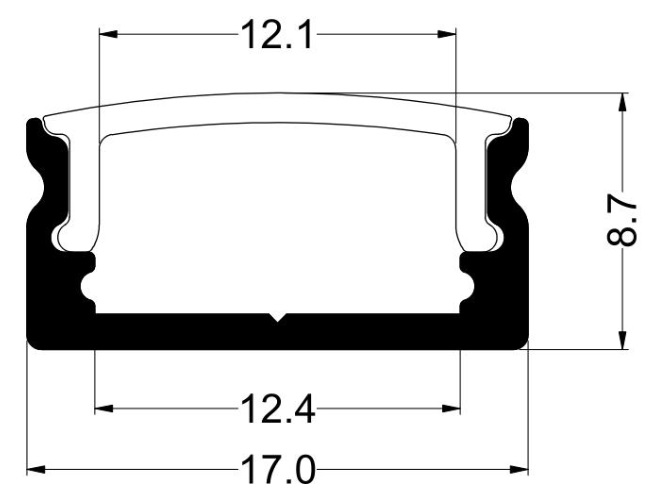
How does the URail IR Rail Switch (item no. 95071/97654/97653/95070) work with the remote control (item no. 95073)?
[This information should only be disclosed if the customer asks for it]
The URail IR Rail-Switch is a connector which, when viewed from the power supply end, can switch or dim all subsequent rails via remote control. Each switch requires 230V. Please refer to the installation instructions for the DIP switch settings.
DIP switches 1 and 2 are used for switching on and off; 3 and 4 are used for switching on and off, as well as for dimming. DIP switch 5 determines whether the System should be switched on or switched off when the wall switch is operated.
How can the Rio socket column be installed on the lawn?
The Rio socket column must be fixed to a solid surface, taking into account the holes in the base plate.
Zigbee in-wall actuator with cross-wiring or two-way switching
For operating the Zigbee in-wall actuator (item no. 50139) with a cross-connection or two-way circuit, refer to Diagram A1 in the installation instructions. The wiring must be changed and extended by the electrician carrying out the installation in the direction of the switch (live wire L / neutral wire N).
How is the Plug & Shine Spot Floor Mini (item nos. 93697/93949/93951) installed in the floor?
The spotlight can be installed in fixed materials (e.g. decking) without the plastic sleeve. The sleeve is used in addition when installing in soil or gravel.
How can the Full-Line COB Slim LED strips from the LumiTiles range be extended?
We do not stock any extension pieces for the particularly narrow LED strips from the LumiTiles range (8 mm).
How far does the screw on the URail suspension (item nos. 96994/97599/95654) extend towards the rail?
It is an M2 threaded screw, with a length of 7 mm and a head diameter of 3.5 mm.
How durable are Paulmann’s recessed floor lamps?
If a recessed floor light is designed to withstand a load, this is indicated by a corresponding symbol. The following applies: 500 kg = static load up to 5 kN; suitable for use by pedestrians and cyclists in non-public areas; 2,000 kg = static load up to 20 kN; suitable for use by vehicles in non-public areas
Sensor-based routine: control only one area
A single routine can be used to control a large number of areas. In the ‘Zones and Scenes’ section, the routine can be expanded using the plus sign.
How do you perform dimming on LED strips?
All LED strips in the Paulmann range are powered by direct current (DC) and, due to the ballast, cannot be used with external dimmers. For this reason, dimmer switches are only compatible in the low-voltage range; these can be found in the accessories section of the website.
How can the URail system be controlled using Zigbee and the Smik gateway?
If the lights/light bulbs on the rails support the Zigbee standard, they can be programmed individually directly into the Smik gateway. Alternatively, a Zigbee control unit can be used in front of individual spots or groups on the rails. Please note that the distance between the Gateway and the Zigbee devices must be taken into account to ensure reliable control.You can find more information on URail installation with Zigbee here (https://de.paulmann.com/innenleuchten/schienensysteme/urail-230v-schienensystem/zubehoer/smart-home/).
How are the Rio socket columns 94313, 94314, 94315 and 94700 wired/connected?
Each socket column has a connection for the 230V supply cable.
94313 (four-socket): Parallel wiring of all sockets
94314 (two-socket with timer): Both sockets respond to the timer setting on the front panel
94315 (three-socket with twilight sensor): The socket on the side of the sensor is controlled by it; the sockets at the rear are on continuous power. 94700 (double with Plug & Shine): Both sockets are on continuous power, 2 x 24V DC with a total maximum power of 75VA
Paulmann motion sensor outdoor: different settings for different time periods
For motion routines linked to the motion sensor (50136/50133), it is possible to set up a second time period using the ‘+’ button on the system page. Together, the two time periods automatically add up to 24 hours and complement one another. Within the same routine, you can thus set up different areas and lighting actions depending on the time of day.
How do you connect two motion detectors to an LED strip?
When installing LED strips, only one control unit may be connected downstream of the power supply unit on the low-voltage side. Connecting two controls at the same time will cause them to interfere with one another.
How is the Zigbee middle feed 50120/50121/96819 constructed?
With the Zigbee middle feed, there is a controller that switches and dims all connected lamps and lights simultaneously. It is not possible to install additional switching elements for separate control. On one side, there is already a connector for attaching a rail. On the opposite side, there is a second connection point in the form of a socket. Here, too, a rail can be used via an additional connector, which receives commands via the identical Zigbee controller.You can find more information on URail installation with Zigbee here (https://de.paulmann.com/innenleuchten/schienensysteme/urail-230v-schienensystem/zubehoer/smart-home/).
Do recessed furniture lights require a continuous cavity?
When lights are installed in a piece of furniture, there should be adequate ventilation around the housing. This should be the clearance specified for the product in order to prevent premature failure. If installed in a blind hole (a mounting hole that is sealed on all sides), a reduced lifetime is to be expected.
In the smik Gateway system (50135), a Zigbee light can be assigned to several areas
In the Smik app, a Zigbee light can be assigned to any number of areas and controlled accordingly. However, in some cases, a light’s firmware may limit the number of areas or groups it supports.
How are LED strips dimmed?
Dimming is only possible using a dimming/switching controller from our range on the low-voltage side; a dimmer connected upstream of the power supply unit will generally not work.
How can the URail infrared switch be replaced?
Our new Zigbee switch has the same effective length as the old infrared switch (18 cm). It is available in chrome matt (https://de.paulmann.com/search?search=95673),Signal White (https://de.paulmann.com/search?search=95674) and Black (https://de.paulmann.com/search?search=95675).It is compatible with the Gent 2 Zigbee remote control (item no. 50140 (https://de.paulmann.com/search?search=50140)). Please note the requirements for your existing lights and lamps.
Can the sensor on under cabinet lights be bypassed if you have a switchable socket?
No, if the light has a switch sensor, this must also be operated to switch it on and off. It is not possible to switch it off or bypass it.
Paulmann motion sensor outdoor: just a single routine
There is no limit to the number of routines that can be created. When creating routines, users can select a sensor that has already been programmed and use it to simulate various scenarios as required. When creating motion routines, once the sensor has been selected, the system displays which two general sensor settings are currently stored in the accessories menu.
How do you desynchronise the MaxLED Flow RGB wireless remote control (item nos. 70965/70966/70967)?
To disconnect the MaxLED remote control, proceed as follows:
1. Disconnect the paired system from the mains
2. Plug the power supply’s cable into the socket
3. Immediately press and hold the desired channel button on the remote control for more than 2 seconds
4. The strip will flash 6 times to confirm
How can URail pendant lights be shortened in length?
To shorten the pendulum length, follow these steps: Open the box with a screwdriver...
[Image]  ...loosen the strain relief at the bottom on the opposite side, unscrew the terminal block indoors, disconnect the cables, pull them out and cut them to length. Strip the insulation from a further 2–3 cm of the cable (there are two wires inside: live (L) and neutral (N)). Crimp a wire end ferrule (https://heinen-elektronik.de/glossar/crimpen/) onto L and N using crimping pliers...
[Image]
...loosen the strain relief at the bottom on the opposite side, unscrew the terminal block indoors, disconnect the cables, pull them out and cut them to length. Strip the insulation from a further 2–3 cm of the cable (there are two wires inside: live (L) and neutral (N)). Crimp a wire end ferrule (https://heinen-elektronik.de/glossar/crimpen/) onto L and N using crimping pliers...
[Image]  [Image]
  Then reinsert both cables into the terminal block and tighten the screws. Press the cover plate back together and screw it in place.
[Image]
Then reinsert both cables into the terminal block and tighten the screws. Press the cover plate back together and screw it in place.
[Image]  Done!
Done!
...loosen the strain relief at the bottom on the opposite side, unscrew the terminal block indoors, disconnect the cables, pull them out and cut them to length. Strip the insulation from a further 2–3 cm of the cable (there are two wires inside: live (L) and neutral (N)). Crimp a wire end ferrule (https://heinen-elektronik.de/glossar/crimpen/) onto L and N using crimping pliers...
[Image]
[Image]
Then reinsert both cables into the terminal block and tighten the screws. Press the cover plate back together and screw it in place.
[Image]
Done! Can furniture lights also be connected directly to a 230V supply?
Due to the compact design of the furniture lights, the electronics are housed in a separate power supply unit and the lights are powered by a low-voltage supply.
Use of the Gateway system during an update
During the update, the Smik Gateway (50135) restarts and is temporarily unavailable. The system cannot be controlled via smart devices for a few minutes. During this time, you can still switch the lights on and switch them off using the standard switches. Updates are usually carried out at night and are rarely noticed by users.
How do you programme the MaxLED Flow RGB wireless remote control (item nos. 70965/70966/70967)?
To pair a system with the MaxLED Flow RGB remote control, follow these steps:
1. Wire the System completely
2. Plug the power supply’s cable into the mains socket
3. Immediately press and hold the desired channel button on the remote control for more than 2 seconds
4. The strip will flash three times to confirm
What is the maximum length to which URail can be laid?
A length of up to 20 m is possible from the power supply. It should be noted that the URail track can be laid in sequence behind the power supply, using up to 10 connectors in succession.
Which LED light bulbs can be used to replace the pin base light bulbs in furniture lights?
If halogen G4 pin base bulbs are used in furniture lights, they can usually be replaced with disc-shaped G4 LEDs (e.g. Paulmann 28775). Please note: You must also check the transformer for any minimum load requirements!
Zigbee in-wall actuator 50139: independent switching via a switch and a smart connection
The in-wall actuator (50139) is wired between the power supply and the switch, so that both control options can be used independently.
How do YourLED and MaxLED strips differ?
YourLED strips (12V DC) have a 4-pin connection, whilst MaxLED strips (24V DC) use a 5-pin connection.
How are the holes in the URail track designed for fixing?
In the URail track, the holes are designed as slotted holes measuring 3 mm × 12 mm.
How is the Vane under-cabinet panel (item no. 93583) wired with a switch?
The product does not come with a switch. Either the socket used must be switchable, or an additional switch must be fitted upstream of the power supply unit.
Integrating the Smik Gateway System (50135) into Alexa routines
To integrate the Smik system with Amazon Alexa, first create a Paulmann Smik account and then link it to your Alexa account. This will also allow you to connect third-party accessories to your Smik gateway system.
What accessories are available for SimpLED?
None of the accessories are available in our range for the standard SimpLED strips.
What is the maximum wattage allowed on the URail system?
A rail system can supply a maximum of 1,000 watts.
Can a clever connect Switch Bowl 99976 control more controllers?
The Clever Connect Bowl 99976 remote control can be connected to an unlimited number of controllers, all of which respond simultaneously to the input.
Using more smartphones with a Smik Gateway (50135)
The smik Gateway allows both Android and iOS smartphones to be connected simultaneously. The connected smartphones all have access to the configured smik lighting system. Changes made on one smartphone are also visible on all the others.
How can the SimpLED Zigbee 70534/70535 strip be operated?
With the combination controller, both the infrared remote control and the integrated Zigbee module can be used. This means the light can be controlled simultaneously using both the remote control and a Zigbee 3.0-compatible smart home system.
How many hangers should be used with each URail track?
The 0.5 m rail has two mounting points for the suspensions, 15 cm from the edge; the 1.0 m rail also has a centre hole. On the 1.50 m/2.0 m rail, in addition to the centre hole, there are holes spaced 20 cm and 55 cm/60 cm from the edges.In total, two suspension points should therefore be used per rail; for the 1.50 m/2.0 m rail, we recommend fitting a third one in the centre.
Can clever connect lights be switched on or off individually or in different ways?
To control different lights or areas in the clever connect system, they must be connected to different power supplies and distributors. If you wish to control them via remote control, a Switch Bowl 99976 is required for each of these combinations.
Running multiple Smik Gateways on a smartphone
Our software currently only allows a single Gateway to be operated per smartphone and app. It is not possible to increase capacity by adding another Smik Gateway.
How can SimpLED strips be cut and reconnected?
Our SimpLED strips can be cut at the marked points, but cannot be rejoined. For bespoke projects involving different sections, please take a look at our MaxLED system.
How many lights can be fitted per URail track?
This depends on the length of the URail track.
A spotlight or pendant light with a standard mounting requires approximately 6 cm of space on the track.
How do I connect or disconnect the Switch Bowl 99976 on clever connect?
Connecting the Switch Bowl remote control to the smart distribution box:
1. Connect the lights fully so that they light up
2. Disconnect the power cable from the power supply unit to the box
3. Connect the plug from the power supply to the controller box and immediately press the ‘On’ button on the remote control once briefly.
4. The light will flash three times to confirm
5. If the light cannot be controlled, repeat the process
Disconnecting the Switch Bowl remote control from the smart distribution box:
1. Connect the light fully so that it lights up
2. Disconnect the connector from the power supply unit to the box
3. Connect the power cable from the power supply unit to the controller box and immediately press the ‘On’ button on the remote control three times briefly.
4. The light will flash three times to confirm
5. If the system can still be controlled, the procedure must be repeated
More Smart Switch (50134) wall switches on the same area
To enable two-way switching in large rooms, the same light can be defined as the target for different switches in the Smik app. This type of switching is useful, for example, in corridors or on staircases.
How do you put the SimpLED RGB Strip Zigbee 70534/70535 into pairing mode?
To pair the SimpLED RGB Strip Zigbee (Item No. 70534/70535), you may need to perform a reset.
To do this, switch on the light, then press and hold the control button (for more than 5 seconds) to reset it.
How many phases does the URail track have?
The URail system is a single-phase rail system.
How many lights from the clever connect range can be connected to a distribution box?
As some lights can also be connected in series rather than just in parallel to the distributor/controller, the total power rating of all the lights must always be checked against that of the upstream power supply unit. The largest transformer has a capacity of 48VA, so the connected components must not exceed 48W.
Can Paulmann Zigbee products be used with Apple HomeKit via the Philips Hue Bridge?
Unfortunately, third-party products are not supported by Apple HomeKit on Gateways such as the Philips Hue Bridge 2. This is due to Apple’s certification process, not Philips’. These third-party products do not appear in HomeKit.
Acoustic Panels with LED Strips
These LED strips are specifically designed for acoustic panels and can be incorporated for decorative effect. Sets are available in warm white and RGBW. Further information at: https://de.paulmann.com/detail/019e8758a36870918fbe3f1a6483f399
How is the URail Connector Inlay (item no. 95554/95661) used in a middle feed or end power feed configuration?
For the power supplies, once connectors have been fitted, there is not enough space to secure the inlay in the direction of the power connection. Here, only half of the inlay can be fitted.
Where is the controller fitted in the clever connect system?
With clever connect, the control unit for adjusting the brightness and white colour is located in the junction box behind the power supply unit. This unit controls all connected lights simultaneously.[Image] 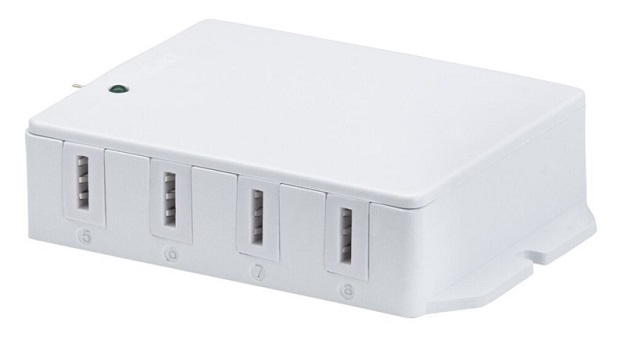
Pairing Paulmann Zigbee products with gateways from other manufacturers
Paulmann Zigbee lamps and lights are compatible with Zigbee 3.0 gateways from other manufacturers. It is also usually possible to control them using Zigbee remote controls from other manufacturers.
Controlling LED strips with music
SimpLED Motion Music offers music-controlled RGB running lights. The sound sensor makes the lights dance in time to the music – or they can be controlled via remote control. Find more at: https://de.paulmann.com/detail/019c28c6d22b71b6888cf1bed3a4c826
Compatibility between URail and ProRail3
No, URail and ProRail3 are not technically or mechanically compatible with one another. Due to the different rail profiles, adaptors and contact guides, the lights cannot be fitted mechanically into the other system.
Where can the clever connect strip 1m Tunable White (item no. 99972) be cut?
The 1-metre Tunable White strip from the clever connect range cannot be cut to size.
Third-party products on Paulmann Smik
Thanks to the Zigbee 3.0 Lightlink protocol, lamps and lights from other manufacturers can also be programmed into the smik gateway.
The Paulmann software is not compatible with the control of other sensors and switches.
Is there a film that comes with the profiles included?
The SimpLED Delta Tube combines a profile and an LED strip in a flexible light tube with a 90° bend. Find more at: https://de.paulmann.com/detail/019c2de0b97873cbbcf2e1dee967be8f
Can the URail system be fitted to plasterboard, and what needs to be taken into account?
Yes, the URail track can also be fitted to plasterboard. In this case, special wall plugs for the 3 mm diameter screws must be used to ensure a secure hold when using the screws supplied. The so-called plasterboard plug is screwed directly into the ceiling panel, for example. There are none of these plugs in the Paulmann range, so please contact a DIY store or online retailer.
What material are the diffusers in the panel lights made of?
We generally use acrylic/Plexiglas (PMMA) for the diffuser disc, as here good light diffusion is achieved.
Smart Plug (50131) in multi-socket sockets
The Paulmann Smart Plug has a very slim design, meaning that adjacent sockets can still be used without any problems.
How can I light my staircase without a mains power supply?
The StairStrip set ensures safety on the stairs without the need for a power connection (71120).
Is the URail IR Rail Switch (item nos. 95071/97654/97653/95070) still available to order?
The URail IR Switch has been permanently discontinued; it can no longer be ordered and none of the remaining stocks are available. A Zigbee alternative, such as the URail Zigbee SpotAdapter, may be recommended.
Are parts of the products permitted to be put into service after structural modifications have been made?
Any modifications to our products will invalidate the guarantee. We recommend that such work be carried out only by a qualified electrician.
Routines using Smart Plugs and fade durations for scenes
Smart Plugs generally only allow you to switch devices on and off. This means that gradual colour changes or dimming are not possible.
Can the 95586 ribbon cable also be used for 230V?
The 95586 ribbon cable for the picture lighting system is designed for a low voltage of up to 24V.
Paulmann lights do not respond to control commands
If lamps and lights do not respond, please check whether the Paulmann lights are within range of the Gateway or another Paulmann light. The range can be optimised by placing another light in the path between the Gateway and the device that is no longer within range, or by reducing the distance between the devices or to the Gateway.
It may also be helpful to optimise the position of the Gateway, for example by not placing it on the floor (a height of approx. 1 m is ideal).
Please note that range can also be significantly reduced by double glazing, metal objects, insulation films with a metal coating, metal underfloor heating systems, solid concrete or metal door frames and door leaves. Here, it is possible to position Paulmann products in such a way as to bypass these obstacles.
When rearranging the products, you should wait a short time until the Zigbee mesh network reconfigures itself and the connection paths to the Paulmann products are re-established (approx. 1–3 minutes).
Can the Tsaro recessed wall light also be operated using the light switch?
The sensorless follower model (item nos. 79999/80000/80001) must be set to ‘ON’ using the switch on the front panel to operate in 230 V switching mode.
Frequency of the Zigbee PWM dimmers for the MaxLED series
The Zigbee controllers for the MaxLED strips use pulse-width modulation at a frequency of 500 Hz.
Can you order bespoke items from Paulmann?
We can produce custom designs or bespoke items provided the order quantity is large enough – approximately 3,000–5,000 units, depending on the product and the complexity involved.
Smik Gateway System (50135) Java log4j2 vulnerability
The log4j2 function is not used in the Paulmann Smik Gateway system.
Can ceiling lights also be fitted to the wall?
Unless otherwise stated, these are generally so-called wall/ceiling lights, which can be fitted both horizontally and vertically.
Please note: For lights with a protection class, protection may only be guaranteed in one direction of installation!
Zigbee Indoor Sensor (Item No. 50133) – Batteries included
Two Mignon LR6 AA batteries are included with the 50133 sensor for operation.
Can ceiling panels also be fixed to the wall?
Unless otherwise stated, our panels can be fitted to both ceilings and walls. If in doubt, please refer to the fitting instructions here.
smik app: multiple Smik Gateways (50135)
With the Smik app, only one Gateway can be used at a time.
Can Paulmann products be used with bus systems such as KNX or DALI?
Generally speaking, Paulmann does not offer any products specifically designed for KNX or DALI.
If a 230V circuit is simply switched using a relay, it is possible to use our lamps and lights.
Please note! If a dimming actuator is used, the dimming characteristics must be compatible (leading-edge or trailing-edge dimming: R, L, C). Incompatibility between the electronic components cannot be ruled out.
Paulmann Zigbee lamps are compatible with the Paulmann Bluetooth App
Zigbee lamps and lights cannot be controlled using the Paulmann Bluetooth App. The wireless protocols are not compatible with one another.
Which systems are the 3 Step Dim gu5.3 light bulbs compatible with?
Our 12V 3 Step Dim reflectors can be operated with the following ballasts: 1. Conventional 12V block or toroidal transformers (50Hz), e.g. 97932
2. Electronic 12V AC transformers (up to 20kHz), e.g. 97767
3. Ballasts with 12V DC, e.g. Corduo cable systems
Paulmann Zigbee products with the Philips Hue Bridge Pro
Thanks to their Zigbee 3.0 certification, all Paulmann Zigbee products can also be used with the new Philips Hue Bridge Pro gateway.
Does a Tsaro recessed wall light act as the ‘leader’ even if the sensor on another ‘leader’ light is triggered?
Yes, Leader lights behave like Followers when the correct channel settings are selected.
Compatibility of Paulmann smart products with Philips Hue
Thanks to the cross-manufacturer Zigbee 3.0 protocol, our smart Zigbee products can also be paired with third-party systems such as Philips Hue.
Can 3 Step Dim products also be used with a standard dimmer switch?
Products fitted with Step Dim electronics can only be operated effectively using a conventional on/off or two-way switch.
As the electronics respond to switching, operation using rotary or push-button dimmers is not possible. Switching via a relay should be avoided.
Smart Plug 50131 with dimming function
The Paulmann Smart Plug (50131) can switch connected devices on and off. Dimming is not supported.
When and under what conditions can stainless steel rust?
There is a general misconception amongst laypeople and non-specialists that stainless steel is, by its very nature, immune to corrosion and rust. And yet, despite the use of stainless steel, rust can still occur. But how is it possible that a high-quality material such as stainless steel can start to rust?
One possible cause is what is known as contact corrosion:
Steel particles (such as metal shavings) can also become lodged on the surface of the stainless steel via the air. After just a short time, surface rust can cause unsightly rust patches to appear in these areas, which, in the worst case, can eat through the entire surface.
Please note: Proximity to railway tracks can, under certain circumstances, mean that surface rust becomes a major architectural problem when stainless steel is used.
So-called ‘rustproof’ steel is equally susceptible to rust when it comes into contact with more aggressive substances, as can be the case, for example, with the use of chlorine in swimming pools.
The same susceptibility to rust can also occur in stainless steel items installed near the coast. This is because the high salt content in the ambient air caused by the sea causes the stainless steel surface to be severely corroded – with the result that the structure will slowly but steadily begin to rust.
In conclusion, it can be stated that whilst stainless steel is significantly more corrosion-resistant, one must by no means assume that it is a building material that is absolutely rustproof in every environment.
However, provided the conditions mentioned above are taken into account, stainless steel is not only a reliable and durable material, but also an aesthetically pleasing one.
Should any surface rust develop, it must be removed immediately to ensure the longevity of the item.
Battery indicator update for the Paulmann Smart Switch (50134)
The battery level indicator on switch 50134 is read regularly after a button has been pressed and is then updated in the Smik app.
Why can’t the Aptare pendant light (76988/76989/79815/79888/79889) be extended properly?
Extending and lengthening the Aptare long-form pendant light works without any problems when suspended at least 90 cm below the canopy.
If a slight rattling sound is audible, this is due to the design, which offers adjustability for different suspension lengths, and helps prevent scratches on the surface.
The Smik Gateway (50135) is flashing continuously
If both the network and internet LEDs on the Smik Gateway (50135) are flashing continuously, there is likely to be a fault with the connection. Here, check both ends of the network cable and the connection on the router via its software.
Why are there none of the fixing screws included with the Tsaro recessed wall light?
The lights are designed for installation in standard recessed boxes with a 68 mm borehole. The fixing screws for the boxes are included in the scope of delivery, so the products are supplied without any additional fitting materials.
The Gateway takes a longer length of time to start up without an internet connection than with one
The Smik Gateway (50135) attempts to connect to the internet at the start. If an internet connection is available, this process is usually so quick that the user does not even notice it. If none of the internet connections are available, the Gateway keeps trying to connect and blocks further initialisation processes until it succeeds. After a certain amount of time, the process is skipped and the rest of the initialisation proceeds.
Why should none of the microfibre cloths be used on chrome surfaces?
The rough texture of microfibre cloths can leave hairline scratches on the chrome surface, which provides a breeding ground for dirt and corrosion. For this reason, leather cloths or soft sponges should be used to clean chrome parts.
Zigbee remote control or Zigbee switch cannot connect to the light fitting via Touchlink
Make sure that the new light fitting has been reset and is therefore not assigned to any other Zigbee network.
Check that only the desired new light is within range.
If necessary, disconnect any other Zigbee lights – including those that have already been programmed – from the mains.
Background:
Zigbee Touchlink pairs with lights within its range. This happens at random; all lights within range are potentially detected and paired. If a paired light is activated, the remote control’s pairing attempt will fail, as the light is already part of a network. However, this also means that the Touchlink pairing process is complete and a new one would need to be started. This is general Zigbee behaviour.
What should you bear in mind regarding the Velora Rainbow range?
The Velora Rainbow range is controlled via an infrared remote control. This means that identical models can be controlled using a single remote control; however, integration into smart systems is only possible via Zigbee on/off switches connected upstream on the 230V side.
After switching off using the standard wall switch or performing a disconnection of the power supply, the lights start up with the last colour or function set (memory function).
Alexa voice command does not trigger
Please check the system for duplicate names. There may be duplicates (living room, ceiling light, etc.) as both individual lights and groups. Alexa always gives priority to its own entries (groups, rooms, individual actuators) over links to external products via a Gateway using a skill.
What should you do if the cable on a pendant light is wavy?
Once the lights have been installed, the connection cables may show slight unevenness due to the way they were packed (coiled). To rectify this, the cable can be warmed with a hairdryer. Once the cable is warm, the kinks can then be straightened out. Uncoiling the cable will significantly reduce the kinks within a short time.
The Smart Switch 50134 no longer switches the programmed group
The Zigbee Smart Switch 50134 uses the existing mesh network to communicate with the programmed lights and lamps. If a device is currently unavailable, the data stream required for switching may be interrupted. We recommend the following procedure:
1. Under ‘Areas/Devices’ – ‘Lights’, check the list to see if any of the listed products have an exclamation mark instead of the light bulb icon on the right as their status.
If this is the case, switch that device off and then switch it on again.
2. If necessary, restart the Gateway once
3. If this does not work, delete the switch from the System, reset it and reprogram it
4. If that does not work, check the battery status of the wall switch and replace the batteries if necessary
What is a motion detector?
Motion detectors are designed to detect movement within the monitored area. They are therefore ideal for switching on the lights in our case. Motion detectors can be categorised as those that react passively to heat radiation (commonly referred to as PIR, IR or proximity sensors) or those that are active in detecting movement using high-frequency waves (HF sensors). Motion detectors usually also feature a built-in twilight switch.
Zigbee lights Gateway app unavailable
Your lights are not accessible via the Gateway app in the following cases:
1. Your lights have been switched off using a traditional light switch (no power supply).
2. Your lights or your smartphone are out of the system’s range.
3. Your Gateway or individual lights are carrying out an update. The system will be operational again after a few minutes.
4. There is a system error.
What is a twilight switch?
A twilight switch switches the light on depending on the prevailing ambient light. After a certain time – which is sometimes adjustable – the light switches off again.
Paulmann lamps and lights with delayed switch-on
Delayed responses may indicate that the distance between Paulmann lamps and lights – either amongst themselves or to the Gateway – is too great. In this case, please reduce the distance between the products and/or the Gateway, or, for longer distances, insert another Paulmann product into the circuit.
Furthermore, the display of the switching process depends on the mobile device used. Depending on the manufacturer and version of the operating system (Google Android or Apple iOS), different switching or display behaviour may occur. In particular, slider commands are not implemented continuously; instead, only the set final value is transmitted.
What is the size of the socket on the Ketil pendant lights?
The socket at the end of the cable in the Ketil series has a diameter of 45 mm and a total height of 98 mm.
LED indicators on the Paulmann Smik Gateway (50135)
On the Smik Gateway, the LED patterns indicate the following: LED 1 = network logo, LED 2 = globe
- both LEDs flash simultaneously = the Gateway is booting up and is not yet ready for use
- LED 1 flashes slowly = connection to the network is being established
- LED 1 is steady = network connection established
- Both LEDs on = Network and internet connection established
- Both LEDs flash 3 times = User settings successfully reset via the Gateway button. If both LEDs flash continuously, the network connection is likely down and the Gateway cannot start up!
What is the maximum thickness a mirror can be so that the lights can be attached to it?
The mirror must be between 3 and 7 mm thick to fit our clip-on mirror lights.
LED indicators on the Smart Plug 50131
The Smart Plug 50131 uses its built-in LED to indicate the following:
The LED is lit continuously: The Smart Plug is supplying power to the connected device
The LED is off: The Smart Plug has cut off the power supply to the connected device.
The LED flashes at one-second intervals:
- The Smart Plug has been reset; the LED flashes for 10 seconds
- The Smart Plug is searching for a Zigbee network to connect to
What power supply do items with a USB port require?
As a USB port generally supplies 5V voltage, a standard mains charger or a power bank can be used to power our USB products. The USB sockets on other host devices, such as a PC, laptop or TV, can also be used as a power source.
‘Duration of the opening scene’ setting
For sensor routines, you can create a start scene and an end scene. Depending on the type of routine, the start scene is triggered when motion is detected or a brightness threshold is reached. The selected start scene remains active for the set duration, or the lighting remains adjusted accordingly. Once the selected duration has elapsed, the end scene is executed.
What are the specifications of the ballast in the Lento light (item no. 79900)?
The Lento pendant light (item no. 79900) contains the Anway AW02-1050G42 ballast with the following specifications:
42W, constant current 1050mA, 30–40V DC, flicker-free, TRIAC dimmable
What does HCL stand for?
HCL stands for Human Centric Lighting – lighting that focuses on people, their well-being, performance and health. Modern LED lighting technology enables a range of light colours and brightness levels, thereby facilitating smart lighting control that can automatically adapt the quality of light to the body’s natural circadian rhythm. This is because light has not only a visual effect, but also an emotional and biological one. Depending on the days of the week and season, the HCL control generates the right light at the right time, either mirroring the natural cycle of sunlight or deviating from it, depending on personal preferences.
How big is the battery compartment on the portable strips (item nos. 70700/70701/70702)?
The battery compartment measures 70 x 64 x 19 mm and is powered by three 1.5 V AA batteries. The leads to the two 80 cm strips have a length of 20 cm.
Resetting the Smik Gateway system (50135)
Both options for resetting the Smik Gateway (50135) relate to the removal of settings and activities carried out by the user.As is standard practice in the industry, the device is not reset to its full factory settings; in other words, the current operating system and the current version of the application software are retained. This is solely because it is not possible to guarantee the compatibility of all elements with software versions that are, in some cases, several years old.
How far is the Velora panel from the ceiling/wall?
The gap between the Velora panel and the installation surface is 30 mm.
Pairing the Smart Switch 50134/50137 with the Smik Gateway (50135)
If several components plus switches are to be integrated into the Smik Gateway, it is advisable to pair the switches first. Thanks to the mesh network, the connection will then be routed directly rather than via other actuators.
How big is the junction box for the Selo LED mirror light (item no. 78950)?
The junction box measures 75mm x 40mm x 16mm.
Why are there four default scenes in the Smik app?
The scenes have been set up by Paulmann and activate lighting atmospheres for different phases of your day-night cycle. ‘Wake-up’, ‘Relax’, ‘Focus’ and ‘Night light’ differ in their brightness and white tones. Lamps that cannot reproduce these scenes are automatically switched off so as not to disrupt the atmosphere.
How can the Volea wall/ceiling light (71177/71178/71179/71180) be used as a pendant?
With the Volea pendant suspension kit (71181 – white / 71182 – black), Volea lights can be used as pendant lights at a maximum height of 150 cm.
Differences between Zigbee remote controls
[Image] 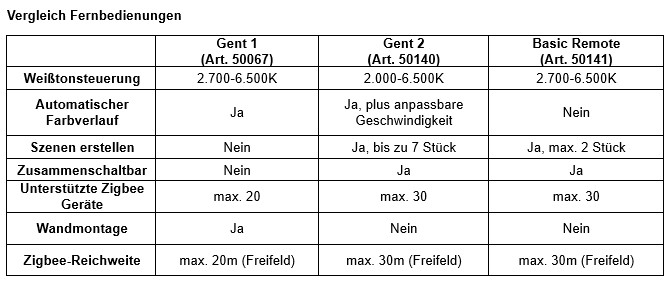
How can the length of the Lento pendant light be adjusted?
There are Reutlingen fasteners in the canopy at the two suspension points. Here, the inner sleeve must be pushed upwards so that the wire rope can be pulled up. Once the desired length has been reached, the inner fastener is released and locked in place under tension.[Image] 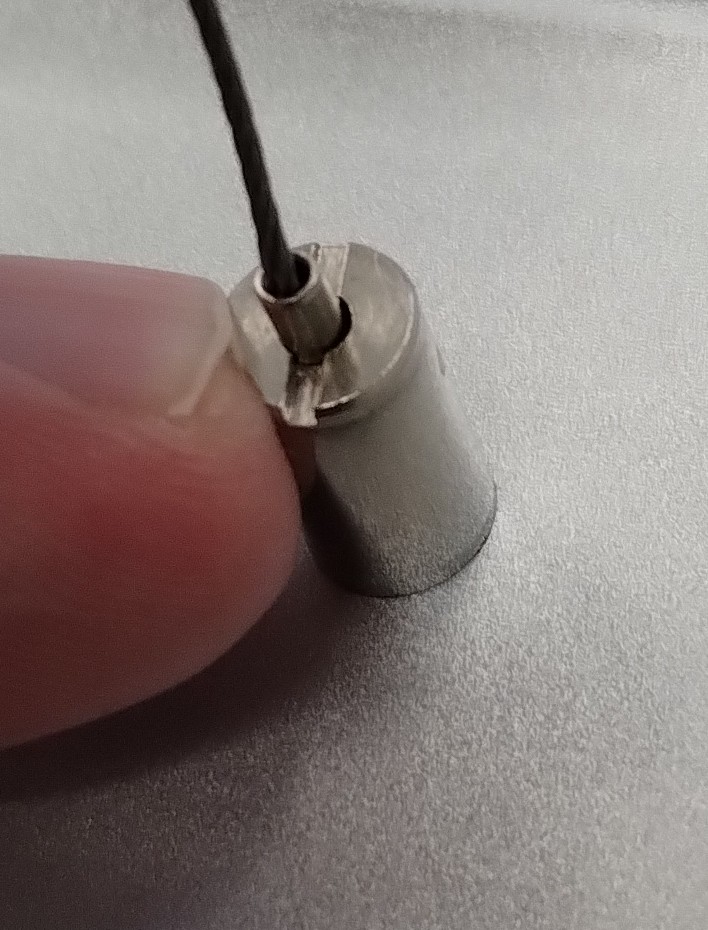
Ideal installation height for the Paulmann motion sensor outdoor (50136)
Optimal sensor detection is achieved when the wall height is between 0.8 and 1.6 metres.
How should the felt lights be cleaned?
Dust can be removed with a soft brush or a vacuum cleaner; any stains can be removed with a clean, damp cloth.
Please do not rub; instead, remove stains by dabbing gently from the outside inwards.
Always ensure that the power supply is switched off before cleaning.
What is Touchlink?
Touchlink refers to the pairing function of smart lights and lamps at a very short distance (30 cm or less) using a control unit (remote control, switch).
Where can I find the production code, and what does it look like?
The production code is located on the product in the area of the information panel featuring the Paulmann logo. It begins with a ‘P’ and up to two further letters, followed by the month and year of production in the format MM/YY. The code can also be found on the underside of the packaging.[Image] 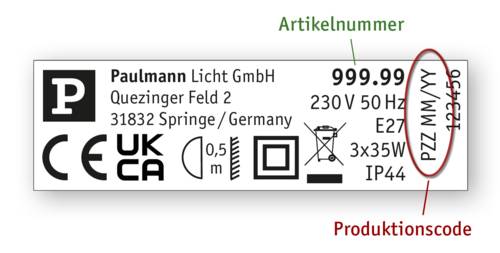
Prerequisites for using routines based on sunrise or sunset
To be able to use routines based on sunrise and sunset times, you first need a software version that supports this feature. Your iOS or Android Smik app must be at least version 1.1.0 (see the left-hand side menu at the bottom of the Smik app), and your Gateway must have at least software version 1.0.871 (see Gateway settings in the Smik app).
In addition, to use routine control based on sunrise or sunset, your Gateway’s location must be determined. To determine the Gateway’s location, we use your mobile phone’s GPS signal. To do this, you must allow the Smik app to access your mobile phone’s location.
Where can I find Decopipe light bulbs?
We offer the Decopipe design with the following light bulbs: gu10 4.9W (item no. 29058), E27 5.5W (item no. 29059)
What is Zigbee?
Zigbee is a wireless communication standard characterised by low data traffic and low energy consumption. The protocol is used in home automation for sensors, blinds, control systems and lighting technology. If a mesh master is used (e.g. our Smik Gateway 50135), every connected device also acts as a repeater.
Thanks to this cross-manufacturer standard, devices from different brands can be combined within a single network.
Paulmann products use the latest Zigbee 3.0 Lightlink protocol.
Installing the Paulmann Smik app on an iPhone
To ensure the smik app works properly on an iPhone, all terms of use must be accepted and access to local networks must be permitted; otherwise, communication between the smik Gateway and the iPhone will not be possible. If the connection does not work the first time, restarting the device or switching to and from flight mode may help.
Resetting the Plug & Shine Zigbee Spot 94849 or putting it into pairing mode
To reset the Plug & Shine Zigbee Spot Shira (94849), switch the power supply off and on again five times. When doing so, ensure that the power is off for 5 seconds and on for 2 seconds each time. The spotlight will then flash for approximately 10 seconds before switching to a warm white colour of 2000K. You can now carry out the pairing process using the remote control or the smart home system.
iPhone won’t connect to the Smik Gateway (50135)
If an iPhone does not connect to the Smik Gateway, it may be because the app does not have permission to access the local network:
1. Open Settings
2. Select the Smik app
3. Activate the ‘Local Network’ switch
4. Scan the QR code from the Gateway again in the Smik app
The Smik Gateway (50135) cannot be reached
If you cannot connect to the Smik Gateway, please ensure that the app is up to date and that your smartphone and the Smik Gateway are on the same network. Sometimes, switching to a different LAN port on your internet router can also help.
Remote control of the Smik Gateway system (50135) is not working
If the remote control for the Smik Gateway (50135) is not working, please check the following points first:
Have you already created a Paulmann account in the Smik app and do you have a login?
Once you have created your Paulmann account, is remote control enabled in the Gateway settings?
Were you connected to the same network as your Gateway with your smartphone when you activated or attempted to activate remote control?
Have you restarted the Smik app yet?
Have you logged in again with your Paulmann account and activated the remote control?
If you’re still having trouble, please feel free to contact our Service Team, for example via app-support@paulmann.de. You’re welcome to ask the following questions straight away:
Does a banner with an error message appear in the Smik app?
If you’re using a voice assistant with the Smik system, is it working properly?
What is your Paulmann account name?
What is the serial number/mac address of your Gateway? You’ll find this information on the sticker on the underside of your Gateway.
Sensor routines are not triggering
If the sensor routines do not trigger, you should first check whether the routine is still active.
In the Smik app, you can check the sensor’s battery status under Areas > Devices > Accessories.
There may also be an interruption in the mesh network. In the menu under Areas-Devices > Lights, all lights that are not accessible are marked with a red exclamation mark. These devices should be reset to their original programmed state by switching the power off and on again. The sensor should now reconnect and trigger the routines again.
Unable to access the Smik Gateway (50135)?
If you are unable to access the Smik gateway (50135), the update service may not have successfully installed the latest firmware version on the gateway. Please contact app-support@paulmann.de with the mac address of your existing Smik Box (located on the underside of the device, directly below the QR code).
None of the cloud connections to my Smik Gateway system (50135) when I’m out and about
If you are unable to establish a cloud connection to the Smik gateway whilst on the move, please check whether your smartphone’s mobile data connection is active and whether you have a strong signal. If this is the case, restart the Smik app and check the connection status again in the Gateway settings.
Control via routines based on sunrise and sunset
For the two routines, ‘Target Time’ and ‘Time Period’, you can choose a specific time, sunrise or sunset as the trigger for an action. With a ‘Time Period’ routine, it is possible to combine the triggers; for example, you can set a light to switch on automatically at sunset and switch off at 6 am the following morning.
If you wish, a routine can be triggered slightly before or after sunrise or sunset.
Interference between WLAN and Zigbee signals
To avoid interference in the Zigbee network, the WLAN signal should be set to 20 MHz (as 40 MHz causes additional interference) and to a fixed channel: 1, 6 or 11.
Paulmann Motion Sensor Outdoor 50136 with Smik Gateway 50135
When supplied, the 50136 sensor is reset and can be paired directly with the Smik gateway. If the sensor has already been in use with a Zigbee gateway, it must first be reset so that it can be detected and paired by a new gateway. Zigbee products can only be part of one Zigbee network at any time.
LED on the Paulmann Smart Switch (50134)
The LED on the Paulmann Smart Switch indicates the following:
Three short flashes after pressing the two lower buttons – the switch has been reset.
Touchlink connection without a Gateway:
LED remains lit for three seconds, followed by six flashes – the switch and Zigbee device have successfully connected or the connection has been disconnected.
Connection via a gateway:
Intermittent flashing for up to 20 seconds after pressing the two lower buttons – gateway searching. A brief flash following a gateway search – the switch and gateway have connected.
Connections on the Paulmann Gateway Smik (50135)
The Paulmann Smik Gateway is equipped with the following ports: Power is supplied via USB-C, whilst connection to the home network and the internet is via LAN/Ethernet cables (both included in the pack).
Types of sensor-based routines using the Paulmann motion sensor outdoor (50136)
With the Paulmann motion sensor outdoor, you can set up routines using various triggers: motion routines and brightness routines
Settings for the Paulmann motion sensor outdoor (50136)
You can adjust the following settings within the sensor itself:- Brightness threshold for motion detection- Motion sensitivityMotion detection is only activated when the brightness falls below the selected threshold. There are four selectable thresholds, ranging from very low to high.The motion sensitivity determines the distance at which the sensor detects movement. There are three settings available, ranging from low to high. These two general settings apply to all motion routines linked to the same sensor, as they are stored on the sensor itself.In addition to motion routines, it is also possible to create brightness-only routines. These process the brightness values supplied by the selected sensor. The activation thresholds can be freely selected for each of these created routines.
Which devices can be used to expand a Zigbee mesh network?
Devices used to extend the mesh network include products such as lamps, controllers and Smart Plugs. Products such as switches or sensors, on the other hand, are Zigbee endpoints and do not relay Zigbee signals to other devices.
Which devices can be connected to the Smart Plug (50131)?
The Paulmann Smart Plug (50131) is designed for use with non-smart lighting products. It is technically possible to use it in conjunction with other types of devices, provided they fall within the supported load capacity. However, we do not provide any warranty for such use.
What light levels does the Zigbee Indoor Sensor (item no. 50133) detect?
The Indoor Sensor 50133 measures lux values ranging from 5 (dark) to 2,000 (bright as day).
Which lighting actions can I select for sensor-based routines?
The following options are available to you:- Default commands: All off, Do nothing, Flash, All on- Default scenes: Day, Relax, Focus, Night- Custom scenes
Zigbee products have a long range
The range between two Zigbee products is 50 metres in open space by default and may vary depending on the type of device. Thanks to the mesh capability (each product acts as both a receiver and a transmitter), the system’s range increases from product to product, meaning that even greater distances can be bridged.
What is the range of the Paulmann Zigbee gateway Smik (50135)?
Our Zigbee gateway, Smik, has a maximum radio range of 100 metres in open space with no obstacles.
However, when it sends a command, the device to be controlled (actuator) must also be able to send a response within this radio range (bidirectional connection).
As none of the data necessary to establish a stable bidirectional connection is available, the range specifications of the actuator must also be checked and, if necessary, additional products installed along the route to act as repeaters or mesh extensions.
Voice assistants with the Smik Gateway
It is currently possible to connect the voice assistants Amazon Alexa or Google Assistant to our System.
Voice commands for the Paulmann Alexa Skill / Google Action
The following voice commands are supported by the Paulmann Alexa Skill:
• Switching individual lights or areas on or off -> Switch on the TV light, Switch off the bedroom light -> Switch off all the lights
• Switching on scenes -> Switch on the ‘Goodnight’ scene, Switch on the ‘Film’ scene
• Adjusting brightness (for compatible lights and areas) -> Switch TV light to 30%, Dimm living room to 10%, Increase TV light by 10%
• Adjusting colours and white tones (for compatible lights and areas) -> Switch living room to red, switch TV light to warm white, switch living room to cool white
Commands are only executed for those devices that support them; for example, a Tunanble White lamp would not respond to the command “Living room red”.
An up-to-date list can be found online on the advice pages and the Skill/Action pages.At present, it is not possible to issue combined commands on Alexa, i.e.:
This works: “Switch on the living room”
This does not work: “Set the living room to 50%” if the living room is currently off, as this is a switch-on command combined with a dimming command
System requirements for the Smik app
The Paulmann Smik app runs on iPhones running iOS 17 or later and on Android smartphones running version 11 or later.
Smik Wireless Standard Gateway
The Smik Gateway uses the Zigbee 3.0 Lightlink protocol and transmits on 2.4 GHz (channel 11).
Detection range of the Paulmann motion sensor outdoor 50136
The motion sensor outdoor (50136) detects light levels during twilight, i.e. during the transition from day to night.
Zigbee gateway for use with the Paulmann motion sensor outdoor 50136
The Paulmann motion sensor outdoor can only be customised using the Paulmann Smik Gateway and the Paulmann Smik app. This allows you to set your own brightness threshold for motion detection, as well as routines to trigger your own custom scenes at specific times. Integration as a trigger unit with other Zigbee 3.0 gateways may be possible using the sensor’s default settings, but this is not guaranteed by Paulmann.
Smik Gateway accessories
Paulmann offers the following products, which can be linked as accessories in the Smik app:
Basic Remote Control (Item No. 50141)
gent 1 remote control (Item No. 50067)
gent 2 remote control (Item No. 50140)
Smart Switch (Item no. 50134)
Motion Sensor (Item no. 50133)
Motion sensor outdoor (Item no. 50136)
Analysis of Smik usage data
When you create a Smik user account, personal data is stored. This data is held on a secure server in Germany. No analysis of data at a personal level takes place. You can find further information in our privacy policy.
Status report on the Smik System Gateway for routine control based on sunrise and sunset times
To determine the Gateway location, we use your mobile phone’s GPS signal. To do this, you’ll need to enable location services on your mobile phone for the Smik app. Your mobile phone’s location will then be displayed on a map, which you’ll need to confirm. It is not currently possible to select a location manually.
Paulmann motion sensor outdoor 50136: Connection mode
Press the Learn button for at least five seconds to activate the connection mode on the motion sensor outdoor (50136). Once the Smik Gateway has successfully added the sensor via the relevant accessory search, the LED will light up for three seconds.
Create a routine in the Smik app
Select the ‘Automation’ menu item to create routines for your Zigbee lights. Depending on the type of routine you choose, you can customise them, for example by selecting specific days, times, scenes, fade-in times and areas. Routines you have created are listed at the top level in the ‘Automation’ area. Deactivated routines are displayed in grey.
Creating scenes in the Smik app
In just a few steps, you can create a scene for an area or room in the Smik app to activate a lighting scenario for all the lamps and lights available there. The copy function makes it easy to save different colours or brightness settings for immediate use.
White bar in the Smik app
On the white balance settings bar, lights are represented relative to your colour perception. This means that different lights may actually produce different shades of white, even though their product symbols are positioned at the same point on the white balance bar.
Reset Zigbee device
The following steps are required to reset a Zigbee device:
1. Switch on the device
2. Switch the power supply off and on again five times in succession, leaving it off for 2–3 seconds and on for 1–2 seconds each time
3. The light will now flash (pulse) for 10 seconds and switch to 100% brightness (warm or cool white)
4. If the confirmation flash is not visible, the process was not successful; please repeat the reset, ideally whilst the device is searching
Size: Paulmann Gateway Smik
The dimensions of the Paulmann Smik Gateway are approximately 72 mm x 84 mm x 26 mm (W x H x D).
Dimensions of the puric pane pendant light with canopy (Item No. 79773)
The canopy of the puric pane pendant light (79773) has the following dimensions:
Length 422 mm / Width 70 mm / Height 38 mm
The centre-to-centre distance between the mounting holes is 300 mm.
Motion Detection: Paulmann motion sensor outdoor 50136
If the motion sensor outdoor (50136) detects movement in accordance with the settings, this is immediately reported to the Smik gateway. Provided that further movements are detected within a subsequent 30-second period, none of the movement notifications are sent to the Smik gateway.
Once 30 seconds have elapsed without any new movement being detected, the sensor reports to the Smik Gateway that the movement has ceased and, from that time onwards, would detect any new movement and transmit it to the Smik Gateway to trigger the routine again.
Reset Paulmann Gateway Smik (50135)
There are two different ways to reset the Smik Gateway (50135):
1. Clean Up via the app:
Scenes, areas and routines are deleted. Devices, cloud connections and app tokens are retained.
- Navigate through the menu to ‘Settings’ -> ‘Gateway’ and select ‘Delete user settings’ at the very bottom
2. Reset via the button on the device casing:
All user data, such as databases and configurations, will be deleted. All user configurations and connections are deleted; paired Zigbee devices are removed from the system.
- Press 5 times within 10 seconds
Before performing the reset, the user should manually disconnect the app from the Gateway in the app’s Gateway settings.
The reset devices will flash to confirm the reset, in accordance with their respective manufacturers’ specifications, and can be paired again.
Removing the switch module from the frame of the Paulmann Smart Switch (50134)
The Smart Switch can be removed from the frame as follows:
If the switch is not fixed in place:
Turn the switch round to face you and press firmly on the inner part to push it forwards. The frame’s locking mechanisms will then release.
If the switch is fixed to the wall:
Use a sturdy, narrow object to pry the switch away from the wall by inserting it between the base plate and the frame.
Delete Paulmann Gateway account
At present, you can only delete your Paulmann account manually. To do so, please send an email to: app-support@paulmann.de
Connecting the Paulmann Smart Switch (50134) to a Zigbee gateway
To pair the Paulmann Smart Switch with a Zigbee gateway, follow these steps: Use the two lower buttons on the switch to activate pairing mode by pressing them briefly three times. The switch LED will then flash at regular intervals for up to 20 seconds. At the same time, pairing mode should also be initiated via the Gateway’s app. To confirm a connection, the switch’s LED will flash rapidly several times. If, after pressing the two switch buttons three times, the LED only flashes briefly three times, the switch has not yet been reset. You will then need to press the buttons again.
Reset the Paulmann Smart Switch (50134)
To reset the Paulmann Smart Switch (50134), press the two lower buttons simultaneously three times. To confirm, the switch will light up briefly three times. If the LED flashes for longer intervals, a reset was not necessary and pairing mode for connecting to a Gateway has already been activated.
Reset Smart Plug (Item No. 50131)
To reset the device, press and hold the switch on the Paulmann Smart Plug (50131) for five seconds. Once the reset is complete, the LED will flash for about 10 seconds.
Connect the Smart Plug Outdoor (50138) with remote control or wall switch to your smart home
The Zigbee module in the Smart Plug Outdoor (50138) cannot be paired via Touchlink; this device always requires a Gateway system that supports the Zigbee standard.
Reset Zigbee Outdoor Sensor (Item No. 18012)
To reset the Zigbee Outdoor Sensor (18012), press and hold the ‘Reset’ button for at least 5 seconds. It will then flash 5 times.
Smik Change the display order of the areas in the dashboard
You can reorder the display of the areas using drag and drop in the overview list of area settings: Open the side menu – Areas/Devices – Areas
Reset Basic Remote Control (50141)
To reset the Basic Remote Control (50141), follow these steps:
1. Press the On/Off button and the ‘+’ button simultaneously three times
2. The status LED will flash three times to confirm
Activate remote control of my Smik Gateway system (50135)
To activate remote control of the Smik Gateway (50135), please follow these steps:
Ensure your mobile phone is connected to the same Wi-Fi/LAN network as your Gateway.
Create an account in the settings of the Paulmann Smik app.
Once the account has been created and you have logged in, go to the Gateway page in the settings and activate remote control using the toggle at the bottom. If you now leave your home network with your mobile phone, control will automatically switch to internet/cloud-based control after a short time.
Reset Gent remote control (50067)
Follow these steps to reset the Gent (50067) remote control:
1. First, press and hold the ‘W’ button in the centre of the colour ring for five seconds.
2. The LED will change its flashing pattern.
3. Now press and hold the ‘On/Off’ button at the top centre of the remote control for at least 3 seconds.
4. The LED will change its flashing pattern.
5. To check, press the ‘+’ or ‘–’ button. There should now be none of the confirmation flash when you press it.
Reset Gent2 remote control (50140)
Follow these steps to reset the Gent (50140) remote control:
1. First, press and hold the ‘On/Off’ button in the centre for at least five seconds.
2. The status LED will light up
3. Now press the ‘On/Off’ button briefly five times
4. The status LED will flash three times to confirm
Disconnect the Touchlink connection between a Zigbee device and the Paulmann Smart Switch (50134)
The Touchlink connection between the Smart Switch (50134) and a paired device must be disconnected as follows. The switch and the devices to be paired must be no more than 10 cm apart. A key combination is required to disconnect the devices.
1. Briefly press one of the two upper buttons to select the group
2. Immediately afterwards, press both upper buttons simultaneously until the LED lights up
3. Then, immediately press the lower left button briefly twice within one second. If the connection is successfully deleted, the LED will first remain lit for three seconds and then flash for a further six seconds.
During this process, only the Zigbee device from which the connection is to be disconnected should be within range of the switch.
Zigbee middle feed configuration 50120/50121/96819
The Zigbee middle feed (50120/50121/96819) features a controller that switches and performs dimming on all connected lamps and lights simultaneously. It is not possible to perform an installation of additional switches for separate control.
On one side, there is already a connector for connecting a rail. On the opposite side, there is a second connection point in the form of a socket. Here, an additional connector can also be used to connect a rail, which receives commands via the same Zigbee controller.
Delete Smart Switch from the Smik Gateway System (50135)
Before deleting the device from the Smik app, you must first press a button on the Smart Switch (50134) to wake the switch up. If this is not done, the device will only be deleted on the Gateway side; the switch itself will not be reset.
The switch must then be reset manually before it can be paired with a Gateway again. The Paulmann Smart Switch will flash briefly several times once the reset has been successfully completed.
Create a routine in the Smik app
Routines are only available when using the Paulmann Gateway. Open the side menu by swiping from the left-hand side of your mobile phone towards the centre.
Select the ‘Automation’ menu item to create routines for your Zigbee lights. Depending on the type of routine you choose, you can customise it, for example by selecting specific days, times, scenes, fade-in times and areas. Created routines are listed at the top level in the ‘Automation’ area. Deactivated routines are displayed in grey.
Tap the ‘+’ at the bottom. Select the routine of your choice. In the next menu, you can customise the routine. For the timer, for example, set the desired countdown time, select the areas and scenes to which this timer should apply, and give your personalised routine a name. Finally, tap the tick in the top right-hand corner. Your routine is now saved and ready to use.
Reset a Zigbee lamp, light or controller
To reset a Zigbee lamp, light or controller, follow these steps:
1. Switch on the device (the light should now come on)
2. Switch the power off and on again five times in succession, keeping it off for 2–3 seconds and on for 1–2 seconds each time
3. The light will now flash (pulse) for 10 seconds
4. If you do not see the confirmation flash, the process was not successful; please start the reset again
5. Following a successful reset, the device will remain in pairing mode for three minutes
Smik app: quick navigation to saved scenes
To quickly access scenes in the Smik app, press and hold the name of the desired area on the dashboard for about 1 second. A scene selection window will open.
Smik Gateway with Amazon Alexa
Here’s how to use the smik gateway with Amazon Alexa:
1. Open the smik app and check that the Gateway is online and all lights are connected.
2. Under ‘Settings’, in the ‘Cloud’ area, activate ‘Voice and Remote Control’.
3. In the Alexa app:
- Navigate to ‘Devices’.
- Click on ‘+’ → ‘Skills and Games’ or ‘Add Skill’.
- Search for the ‘Smik’ skill by Paulmann and activate it.
- When connecting: enter your smik account details to grant Alexa access.
4. Once the skill is active: Have the Alexa app search for devices (“Add device”) or go to “Smart Home → Discover devices”.
5. The Zigbee devices (lights, scenes, groups) connected via Smik should automatically appear as devices in Alexa. You can now use Alexa voice commands, for example:
- “Alexa, switch on the light in the living room.”
- “Alexa, dim the lamp in the bedroom to 50 per cent.”
- “Alexa, activate the ‘Relax’ scene.”
Smik Gateway control via Zigbee2MQTT
Our Smik Gateway uses a proprietary software solution via the accompanying Smik app and is not designed for integration via the Zigbee2MQTT protocol.
Zigbee in-wall actuator (50139) with remote control or wall switch (50134)
The Zigbee module in the in-wall actuator 50139 cannot be paired using Touchlink; this device always requires a gateway system that supports the Zigbee standard.
Basic Remote control (50141) with Paulmann Smik Gateway
To use the Basic Remote control (50141) with the Paulmann Smik gateway, the following steps are required:
1. Reset the remote control
2. Start a device search in the Zigbee system
3. If the LED on the remote control flashes 5 times, the pairing process was successful
4. If pairing fails, you may need to reset the remote control again
5. Once the remote control has been found, all devices on the network can then be programmed via Touchlink
Please note: Communication will then always take place directly between the remote control and the lamp or light fitting!
Gent remote control (50067) with Paulmann Smik Gateway
The Gent remote control (50067) can be integrated into the Gateway network and used. The remote control is displayed in the app; however, it cannot be configured, only deleted from the System. To connect the Gent to the Gateway, the following steps are required:
1. First, reset the Gent (press the ‘W’ button for 3 seconds, then the ‘On/Off’ button for at least 5 seconds)
2. In the menu, navigate to ‘Areas/Devices’, then to the ‘Accessories’ tab
3. Devices can be added using the ‘+’ button (currently a maximum of 5)
4. Once the Gent remote control is selected, step-by-step instructions will appear in the app
The Gent is displayed in the ‘Accessories’ section, just like other accessories, and can be deleted from the app and the Zigbee network from there. It is not displayed in individual areas.
Gent2 remote control (50140) with Paulmann Smik Gateway
To use the Gent 2 remote control (50140) with the Paulmann Smik Gateway, follow these steps:
1. Reset the remote control
2. Press and hold the ‘On/Off’ button on the remote control for at least 5 seconds
3. The remote control’s LED will light up
4. Briefly press the ‘warm white’ button (fire symbol)
5. The LED will start to flash
6. Start the device search in the Zigbee system
7. If the LED on the remote control flashes 5 times, the pairing process was successful
8. If pairing does not work, you may need to reset the remote control
9. Once the remote control has been detected, all devices on the network can then be paired using Touchlink
Please note: Communication will thereafter always take place directly between the remote control and the lamp or light!
Device names in the Smik app
To rename a device in the Smik app, follow these steps: Open the side menu by clicking on the burger icon or by swiping from the left towards the centre. All paired devices are listed under ‘Areas/Devices’ and then in the ‘Lights’ tab. Select the entry you wish to change, click on the current name, edit it, save, and you’re done.
Setting the colours of lights in the Smik app
Colours can be adjusted via the dashboard at area level or for individual devices. Tap either the name of an area or a single device to access the relevant settings page. You can then use drag and drop to move the product icons and adjust the colours according to the devices’ capabilities. An RGBW light can therefore be moved between the colour wheel and the white bar, whilst a Tunable White light is restricted to the white bar.
Creating scenes in the Smik app
To create scenes, please tap the tile for the desired area on the dashboard. You will then be taken to the colour settings page. Once you have configured the devices in those areas with your chosen colours and brightness levels, you can save the settings as a new scene by tapping the ‘+’ icon at the end of the device list. Alternatively, you can use the corresponding function in the ‘Scenes’ tab.
Gent Automatic Colour Change Remote Control (50067)
The automatic colour change is initiated by pressing the ‘P’ button several times. The colour lamps then cycle automatically between red, green and blue.
Transferring the settings from one Gent remote control (50067) to another Gent
It is possible to transfer the products and groups programmed into a Gent remote control (50067) directly to another Gent. This effectively clones the Gent. To do this, place both Gents side by side. Then press and hold the On/Off button for five seconds, first on the sending Gent and then on the receiving Gent.
Upload Gateway logs for fault analysis
Users can upload gateway logs directly to our cloud via the button on the Gateway for troubleshooting: hold the button down for between 5 and 10 seconds. For analysis purposes, the customer must also provide the Gateway’s serial number (located on the underside of the Gateway or on the packaging), as the logs are stored in folders with names that match the serial number.
Pair two 50134 smart Zigbee switches with the same lights
To pair a second Smart Switch (50134) with the same lamps and lights, both switches must be on the same network.
Open the network on the first switch and then connect the second one using the following steps:
1. Press and hold A1 and B1 until the LED lights up
[Image]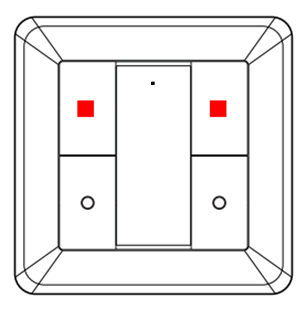
2. Press B1; the LED flashes twice
[Image]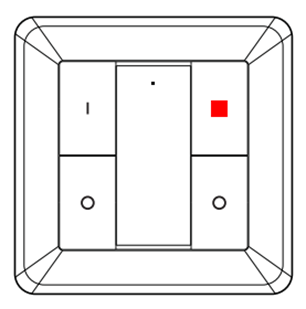
3. Reset using the second switch (press A0 and B0 three times within one second)
[Image]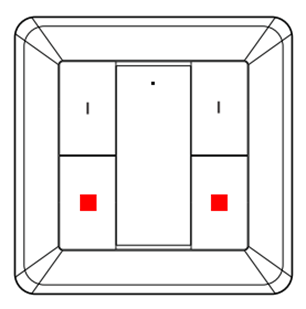
4. The LED on switch 2 confirms the process by flashing 10 times
The second switch can now be programmed to work with all devices that have already been programmed to the first switch using the standard pairing procedure.
Open the network on the first switch and then connect the second one using the following steps:
1. Press and hold A1 and B1 until the LED lights up
[Image]
2. Press B1; the LED flashes twice
[Image]
3. Reset using the second switch (press A0 and B0 three times within one second)
[Image]
4. The LED on switch 2 confirms the process by flashing 10 times
The second switch can now be programmed to work with all devices that have already been programmed to the first switch using the standard pairing procedure.
Loading Azure cloud certificates from the server Smik (50135)
When the Gateway starts up, and then every 10 minutes, it attempts to download Azure cloud certificates from the server. The Azure certificates are a prerequisite for all cloud functions (remote control, Alexa, etc.).
Transfer sensor settings from the Gateway to the sensor
The 50136/50133 sensor is not permanently active; instead, to conserve battery life, it is frequently in sleep mode. Users can select the motion sensitivity and brightness threshold for motion detection in the Smik app. These changes are transmitted when the sensor is active. This occurs in the following situations: - The sensor transmits the current twilight value to the Smik Gateway.- The sensor has detected movement and reports this to the Smik Gateway. - The user presses the ‘Mode’ button on the sensor. New user settings are transmitted to the sensor within 10 minutes at the latest.
Assign accessories to an area in the Smik app
Accessories such as the switch, sensor and remote control are not assigned to any area, as these components cannot be controlled. All integrated accessories can be found and configured via the menu under Areas & Devices > Accessories.
Reset Paulmann Motion Sensor Outdoor 50136
To reset the Paulmann motion sensor outdoor 50136, press the reset button for at least five seconds. If the reset is successful, the LED will flash five times.
Using the Gent 2 remote control (50140) and Smart Switch (50134) together with the same lamps and lights without a Gateway
The Gent 2 remote control (50140) and the Smart Switch (50134) can be used with the same lamps and lights without a Gateway as follows:
1. Reset the Gent 2 to its factory settings[Image] 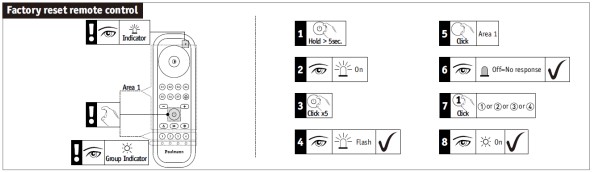 2. Reset Smart Switch to factory settings [Image]
 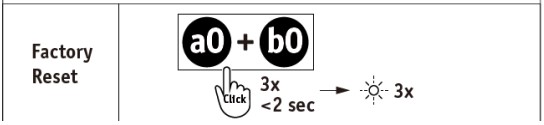 3. Use the Touchlink function on the remote control to connect to the desired product using one of the four channel buttons [Image]
 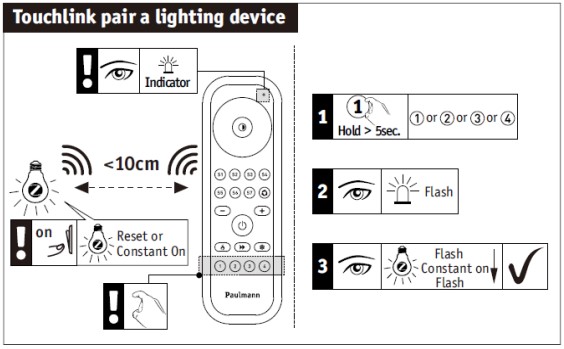 4. Open the network settings on the Gent 2 remote control[Image]
 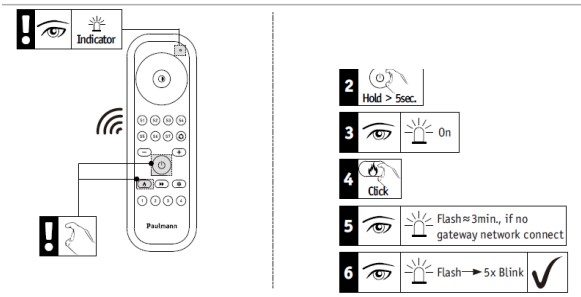 5. Position the Smart Switch within 10 cm of the remote control and switch on connection mode[Image]
  6. Pair Smart Switch with the items that have already been programmed onto the remote control [Image]
2. Reset Smart Switch to factory settings [Image]
3. Use the Touchlink function on the remote control to connect to the desired product using one of the four channel buttons [Image]
4. Open the network settings on the Gent 2 remote control[Image]
5. Position the Smart Switch within 10 cm of the remote control and switch on connection mode[Image]
6. Pair Smart Switch with the items that have already been programmed onto the remote control [Image] Delete user data for the Paulmann Gateway
To delete your user data for the Paulmann smik Gateway, please send an email to app-support@paulmann.de in accordance with the Smik Privacy Policy to delete your smik user account and your personal data. Once your user account has been deleted, remote and voice control will no longer be possible.
Editing entries in the Smik app
Entries in Smik can be edited by swiping from right to left and briefly tapping an entry, as shown in the following examples.
Dashboard menu item:
A short press on an area or a light takes you to the detailed settings for colours, brightness and scenes (for areas). A long press on an area opens the quick selection of scenes. A short press on a scene entry activates the scene. Within the scenes section itself, after swiping on an existing scene entry, you can select ‘Edit’, ‘Copy’ or ‘Delete’.
‘Automation’ menu item:
A created routine can be deleted or copied by swiping on the relevant entry. A short press on a routine entry takes you to individual configuration options, depending on the type.
Menu item ‘Areas – Devices’: A created area, lights and accessories can be deleted by swiping on the relevant entry.
If you tap an area or light entry, you can change the name, icon and assignments for the area and lights. A short tap on an accessory entry takes you to individual configuration options, depending on the product.
Unpair individual items from the Zigbee Remote Control Basic (50141)
To unpair individual devices from the Zigbee Basic remote control (50141), proceed as follows:
1. Switch on the device you wish to unpair so that the lights come on
2. Move the remote control as close as possible to the device
3. Briefly press the ‘On/Off’ and ‘Minus’ buttons three times
Unpair individual items from the Gent Zigbee remote control (50067)
To unpair individual items from the Gent (50067) Zigbee remote control, proceed as follows:
1. Switch on the device you wish to unpair so that the lights come on
2. Move the remote control as close as possible to the device
3. Press the group button containing the actuator you wish to unpair
4. Press the ‘P’ button for 3 seconds
5. The remote control’s LED will flash three times, followed by the lamp or light
The actuator has now been unpair and can no longer be controlled by the remote control.
Unpairing individual items from the Zigbee Gent2 remote control (50140)
To unpair individual items from the Gent 2 Zigbee remote control (50140), proceed as follows:
1. Switch on the device you wish to unpair so that the light comes on
2. Move the remote control as close as possible to the device
3. Press the group button corresponding to the actuator you wish to unpair
4. Press the ‘On/Off’ button for at least 5 seconds
5. When the LED on the remote control lights up, press the double-arrow button (below the ‘On/Off’ button) twice
6. The LED on the remote control will flash.
7. As soon as the device you wish to unpair starts flashing, the connection is disconnected
Dimming lights with the Paulmann Smart Switch (50134)
Pressing and holding the top two buttons on the Smart Switch 50134 increases the brightness for the respective group of lights, whilst pressing and holding the bottom two buttons reduces the brightness.
Setting up Zigbee smart devices
Paulmann lamps and lights enter pairing mode for three minutes from the moment they are switched on, allowing them to be connected to a Gateway, a remote control or another smart home system. If the pairing process does not work, you can reset the device by switching it off and on five times.
Creating scenes and routines for individual devices
It is not currently possible to create scenes and routines for individual devices. At present, scenes and routines can only be created for areas. Consequently, the Paulmann switch cannot currently be linked to individual devices either.
The following option is available: create an area containing the desired individual device, then create a scene in which other devices are switched off or adjusted accordingly.
Pairing Zigbee devices with a Basic Remote control (50141)
To pair Zigbee devices with a Basic Remote Control (50141), proceed as follows:
1. Switch on the device you wish to programme so that the lights come on
2. Move the remote control as close as possible (approx. 10 cm) to the device
3. Press and hold the On/Off button until both the light you wish to programme and the remote control’s status LED start flashing
4. The light will remain lit continuously
5. When the light flashes once more, the programming process is complete
Pairing Zigbee devices with a Gent remote control (50067)
To programme Zigbee devices onto a Gent remote control (50067), proceed as follows:
1. First, switch on the device you wish to programme so that the light comes on.
2. Now move your remote control as close as possible to the device you wish to pair.
3. Press and hold the desired channel button (1, 2 or 3) until both the light and the LED on the remote control start to flash.
4. Please note that during the pairing process (indicated by the lights and the remote control flashing), you must keep the remote control in the same position and not increase the distance.
5. Once the flashing has stopped, you can reposition the components as required.
6. To control the relevant device, simply press the desired channel button briefly and then select the command (On/Off/Colour, etc.).
Important: When pairing, hold the components close together for approx. 30 seconds!
Pairing Zigbee devices with a Gent2 remote control (50140)
To pair Zigbee devices with a Gent 2 remote control (50140), proceed as follows:
1. Switch on the device you wish to pair so that the light comes on
2. Move the remote control as close as possible to the device
3. Press and hold the desired channel button (1, 2, 3 or 4) until both the light you wish to pair and the LED on the remote control start to flash
4. The light will remain lit continuously
5. When the light flashes again, the pairing process is complete
Connecting Zigbee devices to a Paulmann Smart Switch (50134) via Touchlink to connect them
To connect Zigbee devices to the Smart Switch 50134 via Touchlink, ensure that the switch and the devices to be paired are no more than 10 cm apart. A button combination is required to establish the connection.
1. Briefly press one of the two upper buttons to select the group.
2. Immediately afterwards, press both upper buttons simultaneously until the LED lights up. 3. Then, immediately press the lower left button briefly.
Once a connection has been established, the LED will first remain lit for three seconds and then flash for six seconds. During this process, only the Zigbee device with which a connection is to be established should be within range of the switch.
Using two Gent 2 remote controls (item no. 50140) in parallel
To use two Gent 2 remote controls (item no. 50140) in parallel, the following steps are required:
1. Use Touchlink to pair the desired Zigbee devices with a remote control
Open the network by following these steps:
2. Press and hold the On/Off button for 5 seconds until the LED lights up
3. Then press the warm white button straight away; the LED will flash twice
The network is now open for 180 seconds.
Open the network on the additional remote control using steps 2 and 3; place both remote controls next to each other at a minimum distance.
After a short time, the LED on the second remote control will flash briefly to confirm.
You can now also start the pairing process for the devices on the second remote control by pressing one of the channel buttons.
Start Zigbee article after a reset
If the power to a Zigbee product is switched off and then switched on again, it will start up using the last settings (memory function). If a reset is performed or the device is deleted via a Gateway, the light switches on at 100 per cent with a warm white or cool white light colour. The white light colour depends on the chip and the programming: New Telink = cool white
[Image] 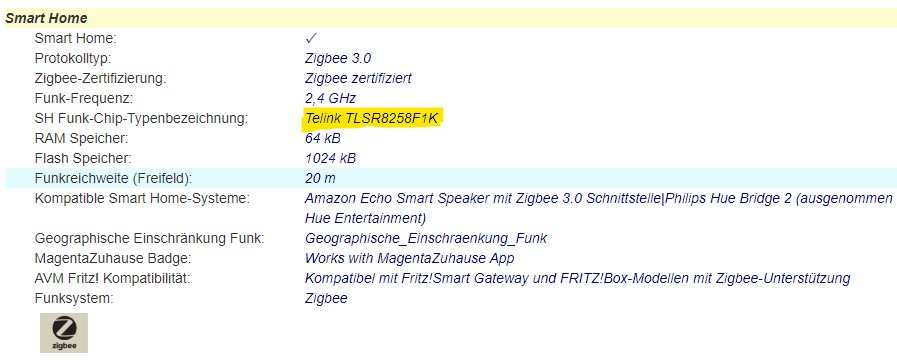 Old NXP = warm white
[Image]
Old NXP = warm white
[Image] 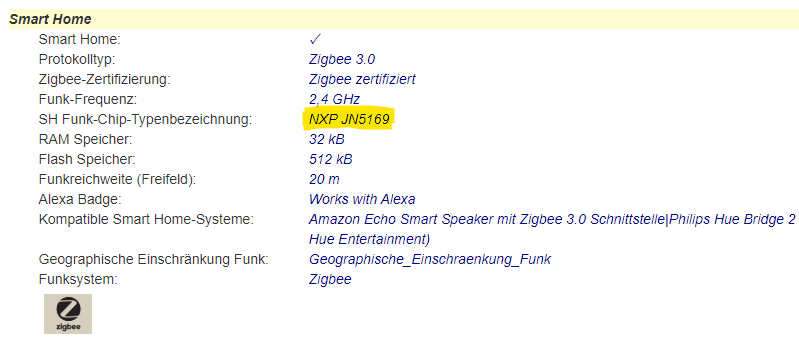
Old NXP = warm white
[Image] Power consumption of the Smart Plug (50131) in standby mode
Smart products are never completely switched off; instead, they remain in standby mode so that they can continue to receive signals. The Paulmann Smart Plug (50131) has a low power consumption of less than 0.3W.
Number of Gent 2 remote controls (item no. 50140) connected in parallel to a Zigbee device
A maximum of 10 Gent 2 (50140) remote controls can be used simultaneously with a single Zigbee product.
Number of Gent remote controls (50067) connected in parallel to a Paulmann Smik Gateway
Any number of Gents (50067) can be programmed. However, due to the nature of the Gent software, there is a cloning effect: - Once the first Gent has been programmed to the Gateway, it can be individually linked to lamps and control them. - Each additional Gent that has been paired with the Gateway automatically clones the linkages of the first Gent.
Number of sensor-based routines using a Paulmann motion sensor
There is currently no limit to the number of routines that can be linked to a sensor.
Number of sensors: 50,136 simultaneously with the Paulmann Smik Gateway 50135
There is nonexistent fixed upper limit on the number of sensors that can be connected to a Gateway at any one time. Rather, it depends in particular on the overall size of the System and, consequently, on the number of other lighting and accessory products in the same System. You can find further information on this on the Gateway’s product page.
Number of Smik user accounts that can be managed using a Smik Gateway (50135)
More smik user accounts can be linked to a single smik Gateway (50135). However, it is not currently possible to use more smik gateways with the same smik user account.
Number of Zigbee devices connected to the Paulmann Gateway Smik (50135)
The Paulmann Gateway currently supports up to 50 Zigbee devices and a further 5 accessories (switches/remote controls).
Number of Zigbee devices: Basic Remote control (50141)
A Paulmann Basic remote control (50141) can be used to control up to 30 devices. All devices can only be controlled together.
Number of Zigbee devices: Gent2 remote control (50140)
With a Paulmann Gent2 remote control (50140), you can control up to 30 devices in four different groups.
Number of Zigbee devices: Gent remote control (50067)
With a Paulmann Gent remote control (50067), you can control up to 20 devices in three different groups.
Number of Zigbee indoor sensors (item no. 50133) connected to the Smik Gateway (item no. 50135)
It is recommended that a maximum of 5 sensors be connected to the Smik Gateway; there is no technical limit.
Number of Zigbee lights connected to the Paulmann Smart Switch (50134) via Touchlink
Each pair of buttons on the Smart Switch can be used to switch on, switch off and perform dimming on up to 15 Zigbee lights, depending on the supported functions.
Firmware updates for the Paulmann Gateway Smik (item no. 50135)
The Smik Gateway (50135) checks the update server initially and then every 10 minutes to see if a new software version is available. If so, the software is downloaded. The update itself then takes place automatically between 3 and 4 am CEST.
During the update, the Gateway automatically reboots, whilst both LEDs flash simultaneously. This process takes up to 4 minutes. Afterwards, the system is operational again and a new firmware version is displayed in the Gateway settings.
The customer is not notified of the update in advance. Following the update, there may also be an app update if, for example, new features have been introduced. In that case, a reference to the new firmware would be provided.
Send log data from the Smik Gateway (50135) to Paulmann
To send the Smik Gateway’s log data to Paulmann for fault analysis, press and hold the button on the side of the housing for 5 seconds.In addition, an email detailing the error encountered should be sent to app-support@paulmann.de (mailto:app-support@paulmann.de).
Pairing Zigbee devices with the Smart Friends Box (50066)
To pair devices with the Smart Friends Box (50066), follow these steps:
1. In the app, tap the ‘Rooms’ area at the bottom centre of the screen.
2. Tap the pencil icon in the top right-hand corner.
3. Select “+ Add another room”.
4. Create a room name and choose a suitable icon. Then save your entry by tapping “Save”.
5. The “+ Add another device” button will appear below the new room.
6. After tapping the button, select the manufacturer of your new devices.
7. Tap the “Search for Zigbee devices” button. The pairing process will now start and take 3 minutes.
8. The devices found will be displayed in this dialogue box. The devices being paired will flash during the process.
9. Devices that are not found should be reset whilst the search is running. To do this, follow our guide on resetting Zigbee devices.
Remove Zigbee lights from the Paulmann Smik app
You can do this very easily in the device menu. Open the side menu by swiping from the left-hand side of your mobile towards the centre. Then select ‘Areas | Devices’ and tap the device you wish to delete. After swiping from right to left on the device you wish to delete, you’ll be presented with a delete option, which you can simply confirm. Your lights will flash when the process is complete. This indicates that it has been removed from the network and can be paired again.
Reset Smart Plug (50131)
To reset the device, press and hold the switch on the Paulmann Smart Plug for five seconds. Once the reset is complete, the LED will flash for about 10 seconds.
Zigbee in-wall actuator 50139 connection
The Zigbee module for installation in switch boxes (50139) can be operated using a two-way switch, a push-button switch, behind a socket, or via direct wiring to the light fitting. Please refer to the operating instructions for the relevant wiring procedures in each case.
Due to the operating voltage of 230V, connection must only be carried out by a qualified electrician.
Setting up the Smart Friends Box (50066)
To set up the Smart Friends Box, follow these steps:
1. Connect the box to the mains using the supplied mains adapter.
2. Wait until the left-hand LED lights up green continuously. The right-hand LED will flash irregularly to indicate its status.
3. Connect the network cable to the internet router and the Smart Friends Box.
4. The middle LED will now light up blue whilst the latest update is being processed. Once it stops flashing, the box is ready for use.
Usage-based Cloud Limiter Smik Gateway (50135) (remote control, voice control, Alexa routines)
There is currently a limit in place that restricts a user’s cloud access to 30,000 accesses per week. These accesses result from the use of remote control and voice control, including integration into Alexa routines. Once this limit is reached, the aforementioned functions will no longer work. The limit is in place to prevent malicious abuse that does not correspond to actual user behaviour. Consequently, the limit is set very high, but is triggered if, for example, a bot or similar is constantly sending voice commands to the System. You can check in the cloud backend whether a user has reached their limit. To do this, please contact our service provider, P3, via the customer service back office. P3 can reset the limiter to 0. Incidentally, the limiter is also legally safeguarded by being mentioned in the accepted terms of use.
The language account cannot be linked to the Smik account
Please ensure that you are logged in under Settings > Cloud > Account and that the switch is activated under Settings > Cloud > Voice and Remote Control. Unless these settings are activated, the digital assistants will not be able to access the Smik Gateway.
Smik app: light bulb icon greyed out
A device icon in the colour settings area is greyed out if a device has been switched off or is not accessible by the Gateway. In the latter case, a red exclamation mark is also displayed next to the relevant device in the device list.
Unable to connect lamps via the Smik app
If your lamps, which have already been connected to the system, are not accessible, please check that they are connected to the mains (the standard light switch must be switched on for this) and ensure that you are within the system’s operating range.
Please contact Paulmann Customer Services if you are still unable to establish a connection.
Create brightness routines with more brightness thresholds
Different threshold values can be set for activating and deactivating brightness routines. As a general rule, it is advisable to set the threshold for deactivation higher than that for activation, in order to account for temporary variations in brightness.
Routines involving sunrise or sunset are not possible
Please check whether you have already set your Gateway location in the Gateway settings. This information is required to use the feature, so that the system can identify the sun positions relevant to you and incorporate them into your routines.
Colour variations in Zigbee RGB products
If Zigbee RGB lamps and lights are controlled by different controllers, such as remote controls and gateways, the colour tone may vary due to slight differences in the parameters. If the LEDs are not from the same batch, or if they are completely different products, a variation can be observed, particularly with mixed colours.
Certain device icons cannot be dragged into the colour wheel
Devices can only be dragged into the relevant colour zones in accordance with the functionality they support. Accordingly, a Tunable White lamp can only be moved within the white slider, but not into the colour wheel.
If you attempt to do so anyway, the colour wheel will be greyed out and the lamp will automatically revert to the white slider. A lamp that is only dimmable or a Smart Plug is displayed as a fixed point on the white slider and cannot be dragged.
New devices, areas or scenes cannot be set up using Alexa or Google Assistant
If new devices, areas or scenes cannot be controlled via Amazon Alexa or Google Assistant, the Paulmann system may not have synchronised automatically with Google or Amazon. In this case, carry out a manual device search:
Alexa:
- App: Devices > + > Add device > Other > Search for devices
- Start via voice command
Google:
- App: + > Set up device > Compatible with devices > Tap Paulmann Action and connect account
- Start via voice command
The figures displayed in the Smik app do not always reflect reality
On the slider used to set the white balance, lamps are represented in relation to their colour capabilities. The slider therefore has none of the following: fixed Kelvin values or end points; the extremes vary for each lamp. However, the colour display on the slider itself is static and presents a white colour spectrum in a clear and illustrative manner (currently 2200–10800K). This can mean that, whilst the actual lamps physically display the same colour value, the icons in the app are positioned offset from one another.
Example: TunW Lamp 1 can be set up to 2700K, whilst TunW Lamp 2 can be set up to 2200K. On the slider, both lamp icons are then positioned on the left at the slider’s maximum setting, but in reality they display different colour values according to their capabilities. If Lamp 2 is to display the same white colour as Lamp 1 in reality, the user must move the icon for Lamp 2 slightly to the right.
Zigbee firmware updates
Firmware updates are designed to optimise your lighting experience. They enable us to keep the system up to date, fix bugs, enhance security and integrate new features.
Updates may be available for the Paulmann Gateway or for Paulmann Zigbee devices connected to the Paulmann Gateway.
Firmware updates for the Smik Gateway System (50135)
Updates to the Gateway software are primarily designed to optimise your lighting experience and ensure system security. We keep the system interfaces up to date, resolve issues or integrate new features in accordance with our terms of use.
The voice control function of the Smik Gateway system (50135) switches on the wrong devices
Please ensure that areas and individual devices have clearly distinct names in both the Smik app and the language service app, as otherwise the wrong devices may be switched on.
Zigbee product not found on the Paulmann Gateway
If a Zigbee device cannot be found by the Gateway, there may be several reasons for this:
- A Zigbee device cannot be part of more than one Zigbee network at the same time. Reset the device in accordance with the manufacturer’s instructions and then start a new device search via the Smik app.
- The distance between the new Zigbee device and the smik Zigbee gateway, or the nearest existing Zigbee device on the smik network, is too great. Despite the mesh network, there may be situations where the radio range is insufficient. Move the device closer to the Smik Zigbee gateway to pair it.
- Another possible cause could be that the Zigbee device has no power. Smart devices require a power supply to pair and, ideally, a continuous power supply to function. Ensure the Zigbee device you are trying to pair is connected to a power source.
Changing the names of areas in the Smik app
To change the name of an area in the Smik app, open the side menu by swiping from the left-hand side of your mobile towards the centre. Then select ‘Areas | Devices’ and tap the area you wish to change. Tap the current name, edit it, confirm by tapping the tick in the top right-hand corner, and you’re done.
Where are the settings for the Paulmann motion sensor outdoor 50136?
Once a Motion Sensor 50136 has been successfully configured on the Smik Gateway, the sensor’s general settings page opens automatically. Here, you can set the brightness threshold for motion detection and the motion sensitivity for motion routines. Routines that utilise sensor data are created in the ‘Automation’ area.
Cloud Backend Storage and User Data
The cloud backend and user data are saved on Microsoft Azure servers in Frankfurt. Usage data is initially saved exclusively on the Gateways and is retrieved as required for analysis purposes. Data is analysed in anonymised form and is not passed on to or sold to any third parties.
Paulmann System Hosting
The Paulmann System is hosted by Microsoft in Frankfurt (Germany).
Hosting the Smik Gateway System
Data such as your user account and the necessary Paulmann cloud services are hosted in Germany.
Zigbee User Guide
Pairing Zigbee devices with the gateway/bridge
1. Start the Zigbee pairing process using the app
2. The pairing process usually takes 30–180 seconds
3. Detected devices are displayed in a dialogue box with the number of devices found; the paired devices will flash during the process
4. Devices that are not detected should be reset during the search process (see Resetting Zigbee devices)
Resetting Zigbee devices
1. Switch on the device
2. Switch the power supply off and on again 5 times in succession at a moderate pace (at intervals of 1–2 seconds)
3. The light will now flash (pulse) for 10 seconds
4. If the confirmation flash is not visible, the process was unsuccessful; please restart the reset, ideally whilst the search is in progress
Pairing the Zigbee wall switch (Item 50134) using Touchlink
The switch and the devices to be paired must not be more than 10 cm apart. A key combination is required for pairing.
1. Briefly press one of the two upper buttons to select the group
2. Immediately afterwards, press the two top buttons simultaneously until the LED lights up
3. Then immediately press the bottom left button briefly.
Once a connection has been established, the LED will initially glow steadily for three seconds and then flash six times. During this process, only the Zigbee device you wish to connect to should be within range of the switch; no other devices should be present.
Pairing the wall switch/Smart Switch 50134 with Amazon Echo*Reset the wall switch if it has already been programmed
1. Open the Amazon Alexa app
2. Go to the ‘Devices’ category and tap the ‘+’ button
3. Select ‘Add device’ and then the ‘Switch’ category
4. Select ‘Other’ as the brand and then start the device search
5. Enter the wall switch’s pairing mode by quickly pressing the lower buttons three times
Once pairing is complete, the Paulmann Zigbee Smart Switch will appear in the Amazon Alexa app under the ‘Switches’ category. You can now connect various devices already connected to the Echo to the switch via Touchlink.
*As at 1 November 2021. We have no influence over software updates carried out by Amazon. We do not guarantee that the Paulmann Smart Switch will work with Amazon Echo devices.
Resetting the Gent remote control (item no. 50067)
1. Press and hold the ‘W’ button in the centre of the coloured ring for 5 seconds
2. The LED changes its flashing pattern
3. Press and hold the ‘On/Off’ button at the top centre for at least 3 seconds
4. The LED changes its flashing pattern
5. To check, press the ‘+’ or ‘-’ button; there should now be none of the confirmation flashes in response to the press. Please note: Any intermittent, irregular flashing is a status indication and is completely normal
Pairing Zigbee devices with the Gent remote control (item no. 50067) using Touchlink
1. Switch on the device you wish to pair so that the light comes on
2. Move the remote control as close as possible to the device
3. Press and hold the desired channel button (1, 2 or 3) until both the light and the LED on the remote control start to flash
4. During the pairing process (indicated by the lights and the remote control flashing), keep the remote control in the same position and do not move it further away
5. Once the flashing has stopped, you can move the components to a different position
6. To switch the light on or off, briefly press the desired channel button and then issue the command (On/Off/Colour, etc.)
Important: When pairing, hold the components close together for approx. 30 seconds!
Unpairing Zigbee devices from the Gent remote control (item no. 50067) from an assigned channel
1. Switch on the device to be unpaired so that the lights come on
2. Move the remote control as close as possible to the device
3. Press the group button for the group containing the actuator you wish to unpair
4. Press the ‘P’ button for 3 seconds
5. The remote control’s LED will flash 3 times, followed by the lamp or light
6. The actuator has now been unpaired and can no longer be controlled via the remote control.
Combining the Gent remote control (item no. 50067) with a gateway/bridge
1. Start the device search in the Zigbee system
2. Press and hold the ‘On/Off’ button on the remote control for three seconds
3. The network opens; the LED on the remote control changes its flashing pattern
4. A device is shown as found in the app (depending on the System)
5. If pairing fails, you may need to reset the remote control
6. Once the remote control has been detected, all devices on the network can then be paired using Touchlink
Please note: Communication will then always take place directly between the remote control and the lamp or light!
Resetting the Gent2 remote control (item no. 50140)
1. First, press and hold the “On/Off” button in the centre for at least five seconds.
2. The status LED will light up
3. Now press the “On/Off” button briefly five times
4. The status LED will flash three times to confirm
Pairing Zigbee devices with the Gent2 remote control (item no. 50140) using Touchlink
1. Switch on the device you wish to pair so that the light is on
2. Move the remote control as close as possible to the device
3. Press and hold the desired channel button (1, 2, 3 or 4) until both the light to be paired and the LED on the remote control flash
4. The light will switch to a steady glow
5. When the light flashes again, the pairing process is complete
Unpairing Zigbee devices from the Gent2 remote control (item no. 50140) from an assigned channel
1. Switch on the device to be unpaired so that the lights are on
2. Move the remote control as close as possible to the device
3. Press the group button containing the actuator to be unpaired
4. Press the ‘On/Off’ button for at least 5 seconds
5. When the remote control’s LED is lit, press the double-arrow button (below the ‘On/Off’ button) twice
6. The remote control’s LED will flash.
7. As soon as the device to be unpaired starts flashing, the connection is disconnected
Connecting the Gent2 remote control (item no. 50140) with a Gateway/bridge
1. Reset the remote control
2. Press and hold the ‘On/Off’ button on the remote control for at least 5 seconds
3. The remote control’s LED lights up
4. Briefly press the ‘warm white’ button (fire symbol)
5. The LED starts to flash
6. Start a device search in the Zigbee system
7. If the LED on the remote control flashes 5 times, the pairing process was successful
8. If pairing fails, you may need to reset the remote control
9. Once the remote control has been found, you can then pair all devices from the network using Touchlink
Please note: Communication will then always take place directly between the remote control and the lamp or light!
Paulmann Lights Compatibility with Homematic IP
Paulmann does not offer any products in its range that are specifically designed for Homematic IP. It is possible to set up our products using the appropriate 230V switch or dimmer actuator. Please note: When performing dimming, ensure that the correct control method is used (leading-edge or trailing-edge)!
What does the exclamation mark in a red circle behind a device or room in the app mean?
An exclamation mark inside a red circle indicates that the app is currently unable to connect to one or all of the devices in the room. However, the app or the Gateway will continue to attempt to establish this connection. A dynamic circle icon appears whilst the app is attempting to connect.
Red exclamation mark in the Paulmann app
A red exclamation mark appears next to a device if it is unreachable. This may be because the device has been physically switched off or is out of range of the control.
What should you do if the switch for the terms of use is not visible when installing the Paulmann app?
If the font size on your smartphone is set too large, the switch for the terms of use may not be visible. To change this – for example, on a Samsung device – please follow this path: Settings/Accessibility/Improve Visibility/Font Size and Style.
Adjustment options within a room or an area
You can customise your rooms and areas. To do this, open the relevant room directly from the home screen or via the side menu. You’ll see the name of the room at the top, with the on/off switch for the entire room to the right of it.
Use the top slider to control the overall dimming level for the entire room. The colour wheel below is used to select a colour. Here, you can either position your lamps individually or group several lights together using drag and drop and select a uniform colour.
The slider below that is used to select the shade of white. Further down, all the lights in the room are listed. There, you can switch the lights on and off individually and adjust their brightness as you wish.
Are standard scenes supported by all types of smart lamps? Why does a lamp switch off when it is activated?
Scenes are only created by lights that are capable of rendering the scene correctly. To ensure the best possible atmospheric effect, lights that cannot reproduce the scene switch off automatically; for example, 2700K dimmable lamps switch off if the ‘Wake Up’ standard scene is activated.
How can the colour of all the lights in a room or area be controlled uniformly?
To control the colour of a room or area consistently, simply click on the room or area where you want to change the colour or white balance. Your lights will be displayed individually on the colour wheel or on the slider below it, which you can use to adjust the white balance.
To set a uniform colour or a specific white tone for the entire room, simply drag and drop the light icons on top of one another. All the lights in the room are now contained within a single icon and can be positioned as desired on the colour wheel or on the white balance slider.
Enabling Dark Mode in the Paulmann apps
You can activate Dark Mode via your smartphone’s settings. The Paulmann Smik app will adjust automatically.
Deleting a scene in the Smik app
You can easily delete a scene in the Smik app via the scenes menu. After swiping from right to left on the scene you wish to delete, you’ll be presented with the delete option, which you can simply confirm.
How can you assign a new icon to devices?
To assign a new icon to a device, go to the side menu, select ‘Areas – Devices’ and then, in the ‘Lights’ tab, select the entry you wish to change, click on the current icon, select a new one, save, and you’re done.
Assigning a new symbol or icon to an area in the Smik app
To assign a new area icon to an area, navigate to the Areas menu. Open the side menu by clicking on the burger icon or swiping from the left-hand side of your mobile towards the centre. Then select Areas – Devices > Areas and tap the area you wish to customise.
Tap the current icon, select a new one, save, and you’re done.
Data security
The app is a purely local application. Paulmann has no access to the installed app and collects none of the data.
Deleting devices in the app
You can easily delete devices from the device menu. Open the side menu. Then select ‘Areas – Devices’ and then ‘Lights’. Swipe from right to left on the device you wish to delete, and you’ll be presented with the delete option, which you can simply confirm.
Creating groups in the Smik app
On the colour settings page, you can create groups by simply dragging and dropping devices onto one another. You can then move the group as a whole and adjust the colours.
Compatibility of Paulmann products with smart home matter
Paulmann is convinced of the importance of a high degree of interoperability between smart home devices and IoT platforms, transcending manufacturer and system boundaries. That is why we have long relied on highly compatible and widely used Zigbee 3.0 lighting solutions, whilst also exploring the new Matter application protocol.
Over the coming years, depending on the area of application, Matter will develop into a link between already established wireless standards such as Zigbee 3.0. Paulmann is continuously assessing the potential introduction of Matter into the Paulmann smart portfolio, taking into account market conditions and customer benefits. We currently consider ourselves ideally positioned for the smart future and to meet our customers’ desired application scenarios.
Creating switch groups in the app
On the colour settings page, you can create groups by simply dragging and dropping devices onto one another. You can then move this group as a whole and adjust the colours.
Load more questions
Load more questions
Load more questions
Load more questions
Load more questions
Load more questions
Load more questions
Load more questions
Load more questions
Load more questions
Load more questions
Load more questions
Load more questions
Load more questions
Load more questions
Load more questions
Load more questions
Load more questions
Load more questions
Load more questions